
Go to documentation repository

Documentation for Axxon PSIM 2.0. Documentation for other versions of Axxon PSIM is available too.
Previous page Next page

By default, the operator cannot delete files from the video archive.
To allow the operator to delete files from the video archive (from the video server, backup archive, videogate, edge storage), do the following:
- In the System settings window, go to the Users tab.
- In the object tree in the lower left part of the screen, select the object corresponding to the operator access rights that you want to change.
The settings panel of the User rights object opens on the right.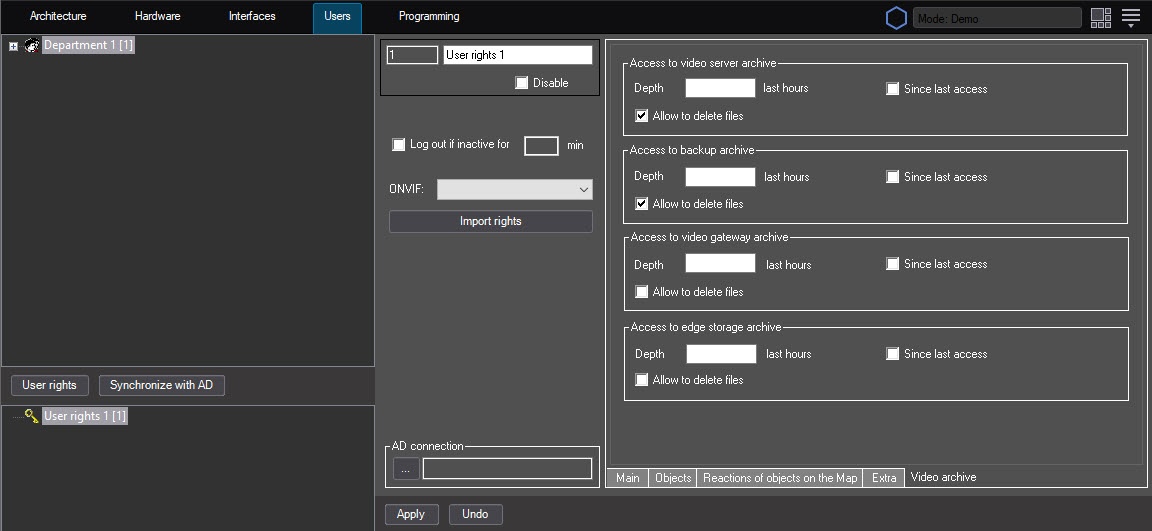
- To allow the operator to delete files from the video archive, set the Allow to delete files checkbox.
Repeat this step for each required type of video archive. - To save the changes in Axxon PSIM, click the Apply button.
Note
You can delete video files in one of the following ways:
- From the interface of the video surveillance monitor—see Delete videos from archive.
- Using the ARCH_DEL_RECORD reaction of the CAM object that is executed using the script or program—see CAM Camera.
Setting the rights to delete files from the video archive is complete.
Overview
Content Tools