
Go to documentation repository

Documentation for Axxon PSIM 2.0. Documentation for other versions of Axxon PSIM is available too.
Previous page Next page

Right after you install Axxon PSIM, it is set to operate with the database of the MS SQL Server format that has the PSIM name.
Note
If you use the Turkish Windows OS language pack and the Axxon PSIM English localization, the connected database must have the "Latin1_General_100_CI_AS" value of the Collation parameter.
In most cases, use the default value of this parameter. Make sure that you use the correct system language settings.
To connect the Axxon PSIM Configuration database, do the following:
- Make sure that the MS SQL Server software operates.
- Start the idb.exe utility located in the root of the Axxon PSIM installation directory (for example, C:\Program Files\PSIM\Tools64). The dialog window of the idb.exe utility opens on the screen.
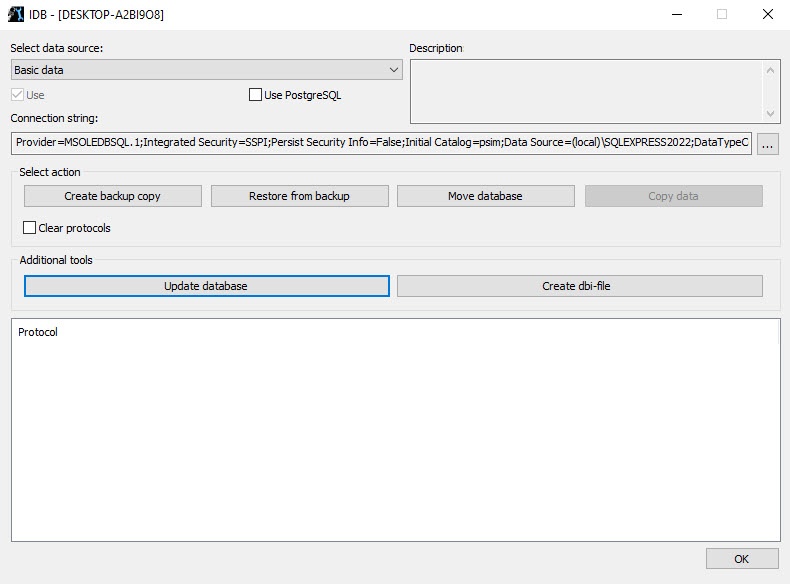
- From the Select data source drop-down list, select Basic data.
The Use checkbox is set by default. - Click the
 button.
The Data Link Properties dialog window opens on the screen.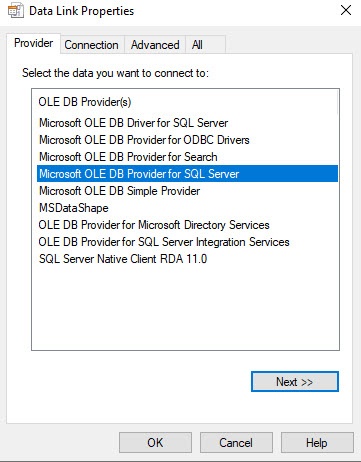
- Go to the Provider tab in the Data Link Properties window.
- Select the Microsoft OLE DB Provider for SQL Server item from the OLE DB Provider(s) list.
- Click the Next button.
As a result, you are automatically redirected to the Connection tab.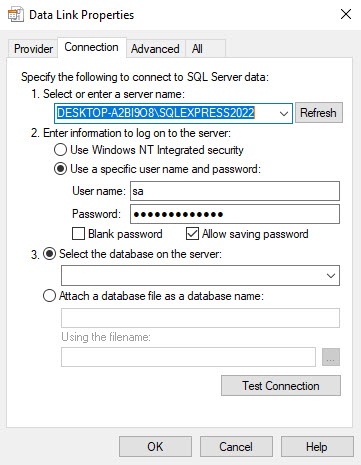
In the 1. Select or enter a server name line, select from the drop-down list or enter manually the name of the MS SQL server that stores the connected database.
Note
If you use the protocol of the dynamic host configuration (DHCP) for the local database, you must set the 127.0.0.1 IP address value without using computer names and the local value in the 1.Select or enter a server name line. We recommend setting the 127.0.0.1 value when you use the static IP address. Otherwise, Axxon PSIM loses connection with its local database when the network cable is disconnected.
If you connect Axxon PSIM to the remote database configuration by the IP address (for example, 192.168.0.68\SQLEXPRESS), you cannot change and save Axxon PSIM settings when there is a network disconnection until it is restored. If you extract the event viewer into an individual database, use any functioning way to specify the server name.- In the 2. Enter information to log on to the server group, specify the type and authentication parameters to connect to the MS SQL server. The MS SQL server authentication is performed through the user account authorized in the Windows OS or by the user name (login) and password that protect the MS SQL server connection.
The method and parameters used for authentication on the MS SQL server are set during the MS SQL server installation.
Depending on the authentication method that is required to connect to the MS SQL server, specify the following parameters:If the MS SQL server authentication is performed through the user account in the Windows OS, select Use Windows NT Integrated security.
Note
If conversion is performed via the remote SQL server, you must register the user account under which the user is currently authorized in the Windows OS on the computer where the MS SQL server is installed and the computer to which you want to connect.- If the MS SQL server authentication is performed through the user name (login) and password, do the following:
- Select Use a specific user name and password.
- In the User name field, enter the user name (login) to connect to the MS SQL server.
- If access to the MS SQL server is protected by a password, clear the Blank password checkbox, and in the Password field, enter a password to access the database.
- Set the Allow saving password checkbox.
Go to the All tab.
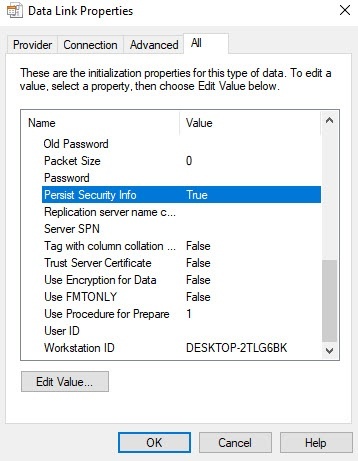
In the Persist Security Info field, set the True value. This is necessary to correctly save the user password.
Note
Each time you change the server connection parameters, you must set the True value in the Persist Security Info field.
- Click the Test Connection button on the Connection tab.
- If you successfully connect to the MS SQL server, the Test connection succeeded message is displayed.
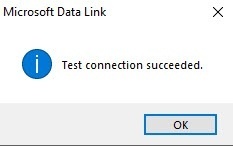
- Click the OK button in the message window to close it
- If you specify incorrectly the MS SQL server name and/or authentication parameters used to connect to the MS SQL server, the corresponding error message appears.
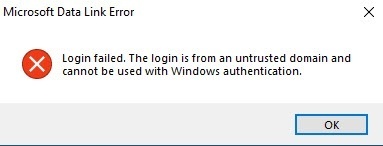
- Click the OK button to close the window. Then change the entered data and try to reconnect to the MS SQL server.
- From the Select the database on the server drop-down list, select the name of the connected database.
Note
You must select a database at this step. If you leave the database field blank, then after you close the Data Link Properties window, the line "Database is not set in connection settings" appears in the database description window of the idb.exe utility, and the OK button to save changes becomes inactive.
- Click the OK button in the Data Link Properties window. The window closes.
We highly recommend updating the database structure. For this, click the Update database button in the idb.exe utility dialog window. If you don't update at this step, it is automatically performed at the Axxon PSIM startup; however, it can be difficult to track errors in this case.
Attention!
If you extract the event viewer into an individual database (see Extracting event viewer into individual database), then when you update the main database structure, the event viewer database structure is also updated. Due to this, we recommend checking the connection to the event viewer database before updating the main database structure to prevent any errors.
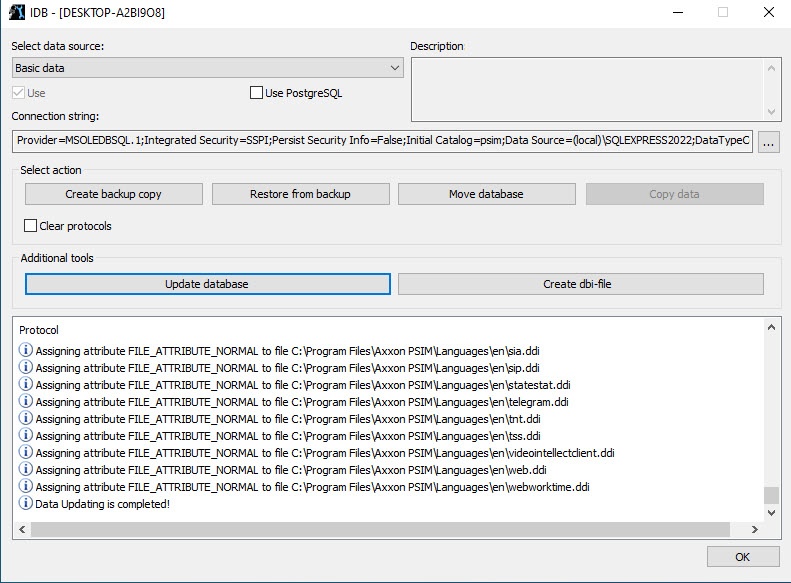
- As a result, the process of updating the database structure starts with the corresponding messages that are displayed in the Protocol table.
- The Data Updating is completed! message that is displayed in the Protocol table of the idb.exe utility indicates the successful completion of the conversion process.
- Click the OK button.
Connecting the Axxon PSIM database is complete.
Overview
Content Tools