
Go to documentation repository

Documentation for Axxon PSIM 2.0. Documentation for other versions of Axxon PSIM is available too.
Previous page Next page

When you use Axxon PSIM in systems with the distributed architecture, you must synchronize the databases of servers and Remote Administrator Workstations. The database synchronization allows storing data both centrally (on one server or the Remote Administrator Workstation) and in the distributed way (data replication from different server and Remote Admin Workstation databases of the video surveillance system). The database synchronization provides parallel operation with server and Remote Admin Workstation databases and their automatic update after modification.
By default, Axxon PSIM databases on servers and Remote Admin Workstations aren't synchronized. Usually, Axxon PSIM is configured to synchronize all databases with one centralized database located on the administration server.
Note
If one or several databases are stored in the MS Access format, you must convert them to the MS SQL server format before the synchronization setup.
The administration server acts as the synchronization source. The second-level server/Remote Administrator Workstation accepts all database changes from the administration server. You must always perform synchronization from the second-level server to the administration server, from the Remote Administrator Workstation to the administration server.
Attention!
On the administration server, you must install all vertical solutions used in the system with the distributed architecture, or the ddi and .dbi files, as well as the updated database containing these files, must be present.
To configure the synchronization of the Axxon PSIM Configuration database with the administration server database (or any other database), do the following actions on the second-level Remote Administrator Workstation/server:
- Make sure that the MS SQL Server software is running.
- Start the idb.exe utility located in the root of the Axxon PSIM installation directory (for example, C:\Program Files\Axxon PSIM\Tools64). The dialog window of the idb.exe utility opens.
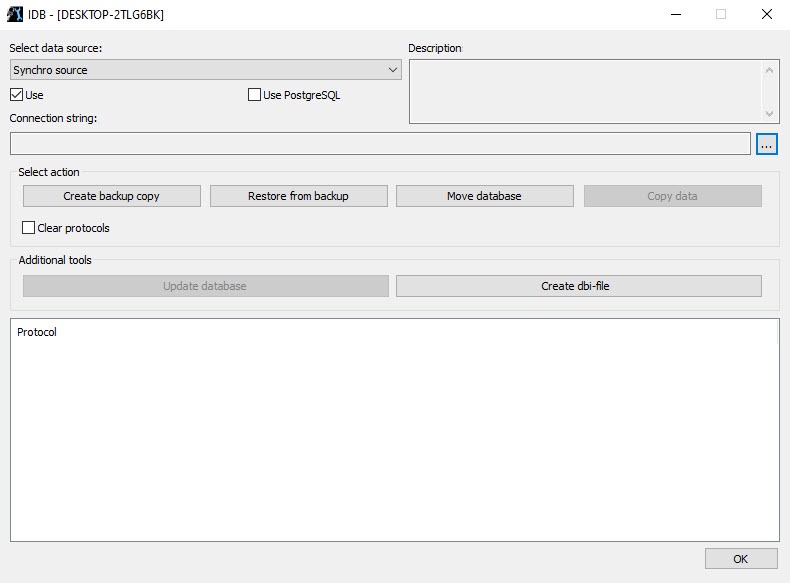
- Select the Synchro source item from the Select data source list.
- Set the Use checkbox.
- Click the
 button.
The Data Link Properties dialog window opens.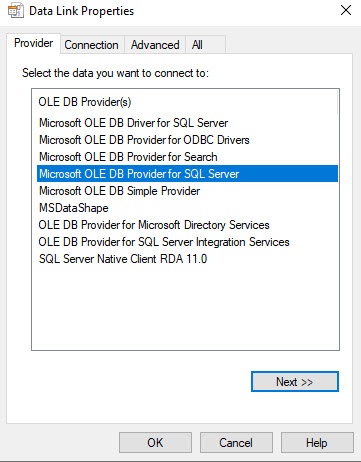
- Go to the Provider tab in the Data Link Properties window.
- Select the Microsoft OLE DB Provider for SQL Server item from the OLE DB Provider(s) list.
- Click the Next button.
- After you click the Next button, you are automatically redirected to the Connection tab.
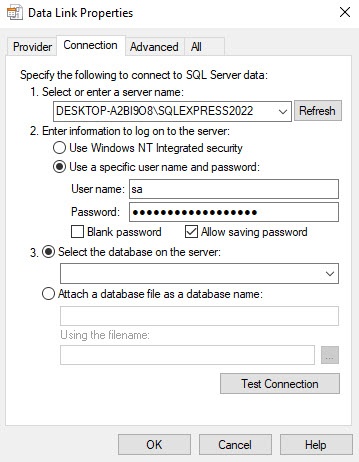
- In the 1. Select or enter a server name line, select from the drop-down list or enter manually the name of the MS SQL server that contains the database from which you want to synchronize the current one.
- In the 2. Enter information to log on to the server group, specify the type and authentication parameters to connect to the MS SQL server. The MS SQL server authentication is performed through the user account authorized in the Windows OS, or by the user name (login) and password that protect the MS SQL server connection.
The method and parameters used for authentication on the MS SQL server are set during the MS SQL server installation.
Depending on the authentication method that is required to connect to the MS SQL server, specify the following parameters:- If the MS SQL server authentication is performed through the user account in the Windows OS, set the switch to the Use Windows NT Integrated security position. Also, you must register the user account under which the user is currently authorized in the Windows OS on the computer from which the synchronization setup is performed on the computer where the MS SQL server is installed and the database with which you want to synchronize is stored.
- If the MS SQL server authentication is performed through the user name (login) and password, do the following:
- In the User name field, enter the user name (login) to connect to the MS SQL server.
- If access to the MS SQL server is protected by a password, clear the Blank password checkbox, and in the Password field, enter a password to access the database.
- Set the Allow saving password checkbox.
Go to the All tab.
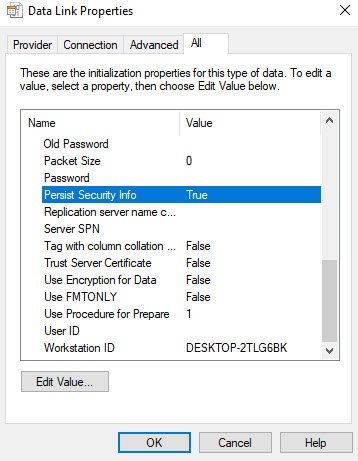
In the Persist Security Info field, set the True value. This is necessary to correctly save the user password.
Note
Each time you change the server connection parameters, you must set the True value in the Persist Security Info field.
- Click the Test Connection button on the Connection tab.
- If you successfully connect to the MS SQL server, the Test connection succeeded message is displayed.
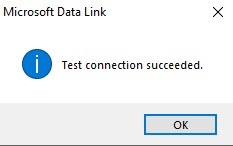
- Click the OK button in the message window to close it.
- If you specify incorrectly the MS SQL server name and/or authentication parameters used to connect to the MS SQL server, the error message appears.
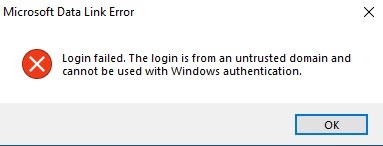
- Click the OK button to close the window. Then change the entered data and try to reconnect to the MS SQL server.
- From the Select the database on the server: list, select the name of the database with which you want to synchronize the current one.
Note
You must select a database at this step. If you leave the database field blank, then after you close the Data Link Properties window, the line "Database is not set in connection settings" appears in the database description window of the idb.exe utility, and the OK button to save changes becomes inactive.
- Click the OK button in the Data Link Properties window. The window closes.
- Click the OK button located in the bottom right corner of the idb.exe utility window.
Configuring the database synchronization is complete.
Overview
Content Tools