
Go to documentation repository

Documentation for Axxon PSIM 2.0. Documentation for other versions of Axxon PSIM is available too.
Previous page Next page

You can manually clear events from the PROTOCOL table using SQL queries in the following way:
Attention!
Once you remove events, it cannot be undone. We recommend creating the backup copy before removal (see Create a backup copy of databases).
- Shut down Axxon PSIM if it is running.
- Determine the events that you want to remove from the events database.
- Open the main.ddi file using the configuration settings utility (see The ddi.exe utility for editing database templates and external settings file):
- Select the object whose events you want to delete.
- Go to the Events tab to view the names of removed events in the database.
In SQL Server Management Studio, run the query to remove selected events:
delete FROM [Axxon PSIM].[dbo].[PROTOCOL] where action = 'action'

where

[Axxon PSIM].[dbo].[PROTOCOL] — is the name of the table with events;

action — is the name of the event to be deleted in the database.
As a result, selected events are removed from the PROTOCOL table using the SQL query.
For example, if you want to remove all Alarm events of the Camera object, then do the following:
- In the main.ddi file, select the Cam object (1).
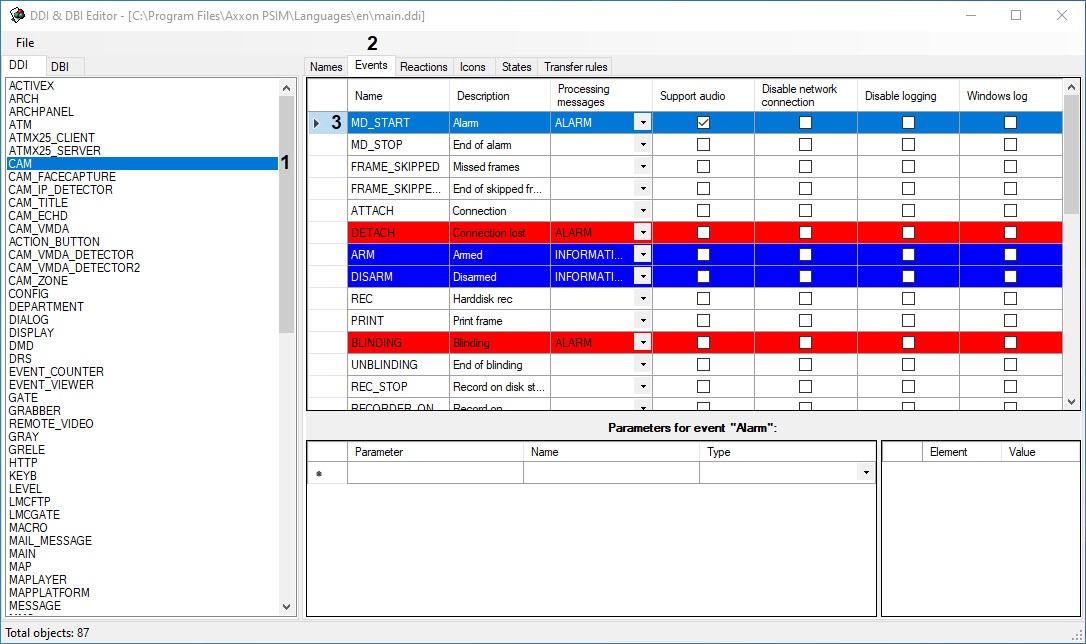
- Go to the Events tab (2).
- Find the name of the removed Alarm event in the MD_START (3) database.
In SQL Server Management Studio, run the query:
delete FROM [Axxon PSIM].[dbo].[PROTOCOL] where action = 'MD_START'
As a result, the Alarm camera events are removed from the events table.
Overview
Content Tools