
Go to documentation repository

Documentation for Axxon PSIM 2.0. Documentation for other versions of Axxon PSIM is available too.
Previous page Next page

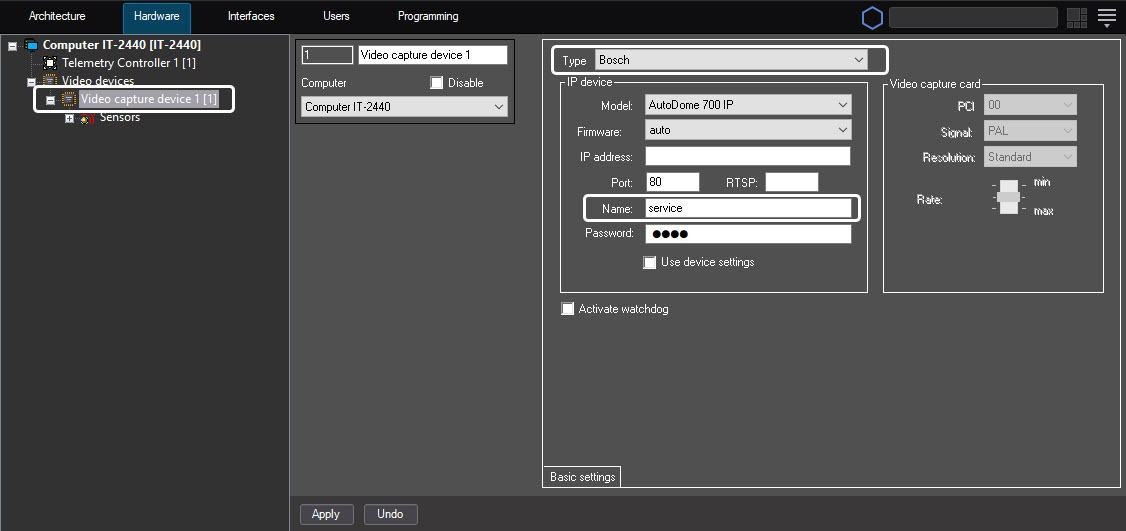
If you connect relays to the Axxon PSIM server via the IP device, select the corresponding type of the IP device on the settings panel of the Video capture device parent object, then set the IP address, port, name, and password to connect to the camera (see the Configuring IP devices section).
Note
If you connect the relay to the Axxon PSIM server via the Bosch IP device, then specify the service value in the Name field. At another value, the functionality of the given relay on the server isn't performed.
If you use the Smartec STS-IPT-880 IP server, you must connect sensors to those video channels for which the Camera objects are created. The video channel with the N number corresponds to two sensor connection channels with the 2N-1 and 2N numbers.
Note
The Smartec STS-IPT-880 IP server supports up to eight video channels and 16 sensors (two sensors for each channel).
To connect each pair of sensors, you must create the Camera object with the N channel number, then create two Sensor objects with the 2N-1 and 2N channel numbers. The Camera and Sensor objects are created on the basis of the common Video capture device object of the Smartec type. If you connect sensors via the inactive video channel (the Camera object is absent), then the sensor functionality on the Axxon PSIM server isn't performed.
To implement the sensor functionality on the Axxon PSIM server connected via the AEBELL BL-E704F IP server, disable the Auto Work Plan IP server mode. You can enable/disable this mode either via the Web interface of the IP server or in the dialog window of the Network DVR Monitor System utility (see the reference documentation on the IP server).
Overview
Content Tools