
Go to documentation repository

Documentation for Axxon PSIM 2.0. Documentation for other versions of Axxon PSIM is available too.
Previous page Next page

The process of integrating hardware and software (functional) modules with Axxon PSIM consists of the following stages:
- Editing the DBI file.
- Editing the DDI file.
- Preparing the module.mdl file, where module is the name of the integrated module (this file is the transformed DLL file).
- Preparing the executable module.run file, where module is the name of the integrated module (this file is the transformed EXE file).
- Placing module.mdl and module.run in the Axxon PSIM\Modules directory.
The figure below shows the interaction graph between the functional module and the system kernel.
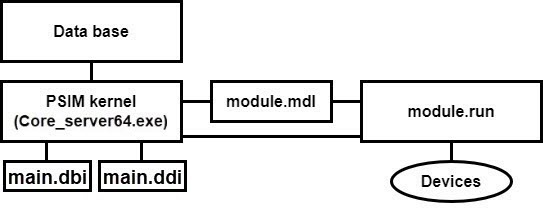
The DBI and DDI files contain the information on the integrated functional modules (objects) required for the system kernel operation. The DBI file describes the structure of Axxon PSIM's configuration database. The DDI file describes objects and their parameters. When you integrate an object, the name of the object, its integration parameters, and related system events with reactions are added to these files.
The MDL file is used for working with objects of one type: create, edit, delete, and modify object parameters during the setup or operation; save them in the database; and perform several special operations. The MDL file also ensures the transmission of the created or modified object parameters to the executable module (the RUN file) and stores the configurations of object settings panels.
The executable RUN file interacts with devices, transmits the event information to the kernel, and enables device management.
Then we describe the steps for module integration on the example of the DEMO module, which emulates operation with virtual hardware. This module includes devices with unique addresses for accessing and polling these devices. The system allows performing a certain set of actions with devices and transmitting all their events to the system kernel.
Overview
Content Tools