
Go to documentation repository

Documentation for Axxon PSIM 2.0. Documentation for other versions of Axxon PSIM is available too.
Previous page Next page

This section shows how to add information on the DEMO object to main.ddi by using the text editor.
To add information on the DEMO object to main.ddi, do the following:
- Open the main.ddi file in the text editor that is located in the Axxon PSIM\Languages\en folder.
Add the <Objects> child element that contains the object description in the <DataSetDDI> section.
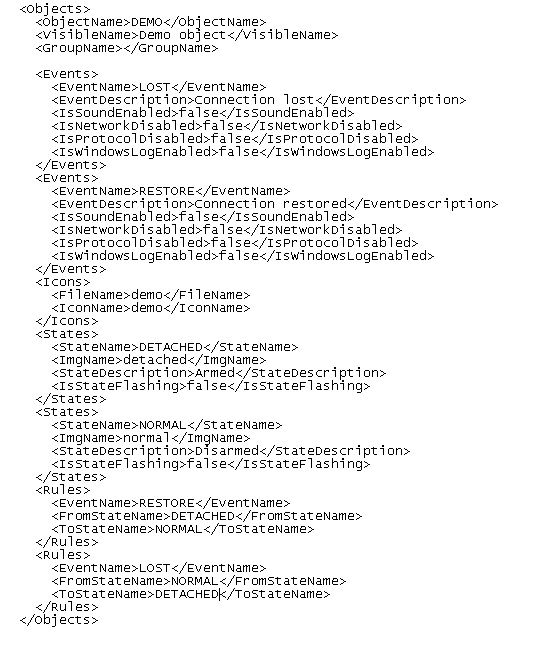
Note
For the DEMO object, the <Reacts> section is missing because this object doesn't perform any actions.Note
The DDI file elements are described in detail in APPENDIX 1. DDI file structure.Save the changes to the main.ddi file.
Entering the information on the DEMO object to main.ddi is complete.
Attention!
After you change DDI files, you must update the database structure by using the idb.exe utility (see steps 4–7 of the Adding objects to main.dbi section).
Overview
Content Tools