
Go to documentation repository

Documentation for Axxon PSIM 2.0. Documentation for other versions of Axxon PSIM is available too.
Previous page Next page

The Windows section is used to set the startup of the Windows OS. The settings panel of the Windows section is shown in the figure.
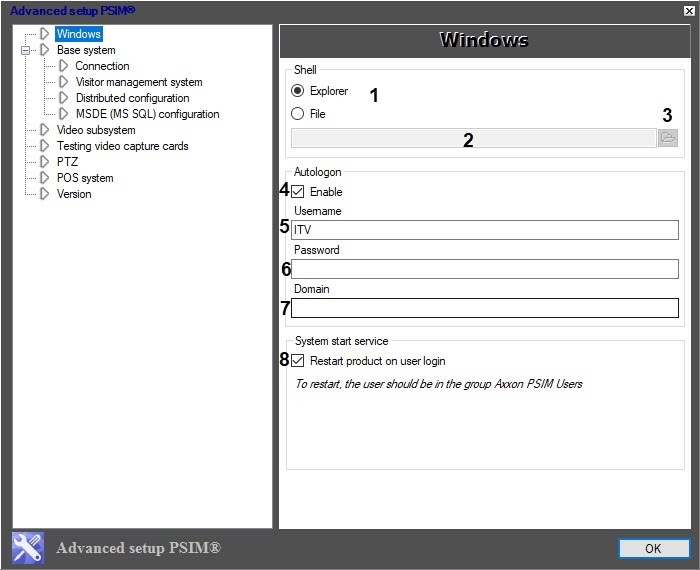
The setting parameters of the Windows section are described in the table.
No | Parameter name | The way to specify the parameter value | Parameter description | Representation | Default value | Range of values |
The Shell group | ||||||
1 | The Explorer/ | Set in the position | Selects the valid Windows OS shell. Attention! To start Axxon PSIM as the OS shell, you must disable UAC. If you want to completely disable UAC in OS Windows 8 and Windows 8.1, you must configure the local security policy—see OS settings for correct operation of remote administrator’s workstation or server | NA | Explorer | Explorer—Microsoft Explorer is loaded as the valid Windows OS shell (corresponds to the standard Windows OS settings). File—Axxon PSIM starts as the valid Windows OS shell |
2 | The File field | Enter the value in the field. Note. The field is active when the switch is in the File position | Specifies the full path to the Windows OS file shell | NA | NA | The core_server64.exe or host_client.exe executive file is selected as a shell |
3 | The | Press the button. Note. The button is active when the switch is in the File position | Opens the standard Open Windows dialog window to select the Windows OS file shell. The field displays the full path to the file shell | NA | NA | The core_server64.exe or host_client.exe executive file is selected as a shell |
The Autologon group | ||||||
4 | The Enable checkbox | Set the checkbox | Activates the automatic user login to the Windows OS | Boolean type | Clear | Set—the automatic user login is activated Clear—the automatic user login isn't activated |
5 | The Username field | Enter the value in the field | Sets the user name to log into the Windows OS | NA | NA | Up to 64 characters. Depends on the settings of the user account in Windows OS (stored either locally or on the domain server) |
6 | The Password field | Enter the value in the field | Sets the user password to log into the Windows OS | NA | NA | From 8 to 14 characters. Depends on the settings of the user account in Windows OS (stored either locally or on the domain server) |
7 | The Domain field | Automatically | Displays the name of domain server (if there is any), which stores the user credentials (user name and password) | NA | NA | Depends on the settings of the domain network (OS Windows network settings correspondingly) |
| The System start service group | ||||||
8 | The Restart product on user login checkbox | Set the checkbox | Specifies the way to restart Axxon PSIM installed as a service when user log into the system | Boolean type | Set | Set—Axxon PSIM installed as a service restarts under the current user only if it belongs to the PSIM Users group Clear—Axxon PSIM installed as a service doesn't restart under the current user even for the users that belong to the PSIM Users group |

Overview
Content Tools