
Go to documentation repository

Documentation for Axxon PSIM 2.0. Documentation for other versions of Axxon PSIM is available too.
Previous page Next page

The PSIM section is used for the Axxon PSIM advanced setup. The settings panel for the PSIM section is shown in the figure.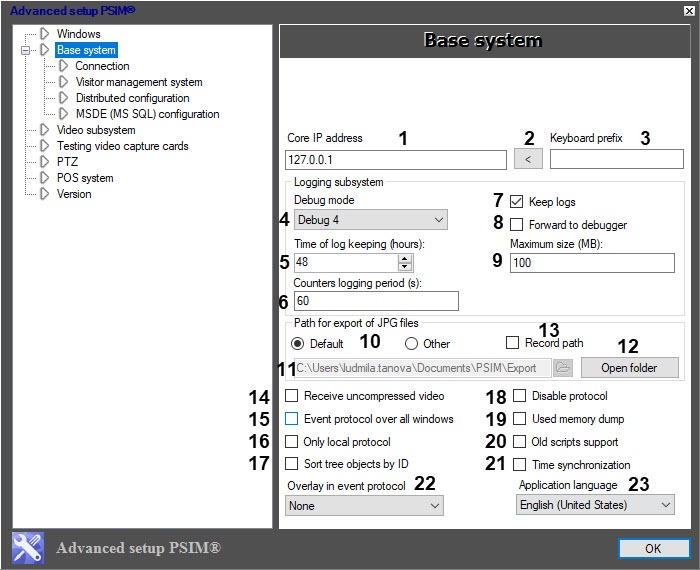
The setting parameters of the PSIM section are described in the table.
No | Parameter name | Method of setting the parameter value | Description | Representation | Default value | Value range |
1 | The Core IP address field | Enter the value in the field | Sets the IP address of the Axxon PSIM server to which the Host_client.exe client module connects by default. Note. Configure this parameter on the client | IP address | 127.0.0.1 | Depends on the server network settings. In case of connection failure, the dialog window requesting the IP address is displayed |
2 | The | Click the button | Sets the IP address of the local computer. Note. Configure this parameter on the client | IP address | NA | NA |
3 | The Keyboard prefix field | Enter the value in the field | Sets the prefix for the special keyboard. It allows Axxon PSIM to detect commands received from special keyboards | Character | NA | Usually, a tilde (~), code 126 |
The Logging subsystem group | ||||||
4 | The Debug mode drop-down list | Select the value from the list | Sets the display mode of the Axxon PSIM debug window (see The Debug window) | List of available debug window display modes | Starting with the 1.0.1.172 hotfix, the Debug 4 mode is enabled by default. Before this hotfix—Disabled |
|
5 | The Time of log keeping (hours) field | Enter the value in the field | Sets the time of keeping log files | Sequence of numbers | 48 hours | > 0 |
6 | The Counters logging period (s) field | Enter the value in the field | Sets the time interval in seconds during which the information on the processor, memory, and disk load is entered in the log file | Sequence of numbers | 60 | Integer positive numbers not less than 60 and zero. If you set the 0 value, the sensor data isn't included in the log file |
7 | The Keep logs checkbox | Set the checkbox | Enables the system events recording to log files | Boolean type | Set | Set—events are saved in log files Clear—events aren't saved in log files |
8 | The Forward to debugger checkbox | Set the checkbox | Enables the debugger | Boolean type | Clear | Set—the debugger is used Clear—the debugger isn't used |
9 | The Maximum size (MB) field | Enter the value in the field | Specifies the maximum size of memory that log files can use. Log files are archived after that size is reached | Sequence of numbers | 100 MB | >= 100. Values less than 100 Mb are ignored |
The Path for export of JPG files group | ||||||
10 | The Default switch | Set in the position | Sets the path to the frames export folder from the Axxon PSIM video archive (see Frame export) | NA | By default (full path to the export folder C:\Users\%current username%\Documents\Axxon PSIM\Export\) | Default—export is performed to the (the full path is specified) C:\Users\%current username%\Documents\Axxon PSIM\Export\ folder Other—export is performed to the selected folder, the filed path to the folder is available for editing |
11 | The Other field | Enter the value in the field | Sets the path to the frames export folder from the Axxon PSIM video archive when the switch is set in the Other position Note The specified path is saved to the ExportDir registry key located in HKLM\SOFTWARE\WOW6432Node\AxxonSoft\AxxonPSIM\Video (see Registry keys reference guide). | Path to the folder | NA | NA |
The | Click the button | Opens the to select the frames export folder from the Axxon PSIM video archive when the switch is set in the Other position Note The specified path is saved to the ExportDir registry key located in HKLM\SOFTWARE\WOW6432Node\AxxonSoft\AxxonPSIM\Video (see Registry keys reference guide). | Path to the folder | NA | NA | |
| 12 | The Open folder button | Click the button | Opens the current folder for frame export | NA | NA | NA |
13 | The Record path checkbox | Set the checkbox | The checkbox allows prohibiting the change of export folder when you export the archive period Note The selected value is saved to the ExportDirFixed registry key located in HKLM\SOFTWARE\WOW6432Node\AxxonSoft\AxxonPSIM\Video (see Registry keys reference guide). | Boolean type | Clear | Set—export folder change is forbidden Clear—export folder change is allowed |
Out of the group | ||||||
14 | The Receive uncompressed video checkbox | Set the checkbox | Enables receiving the uncompressed video from the server. As a rule, you can configure it on the client | Boolean type | Clear | Set—client receives the uncompressed video from the server Clear—client receives the compressed video from the server |
15 | The Event protocol over all windows checkbox | Set the checkbox | Enables displaying the Event protocol interface window over all windows | Boolean type | Clear | Set—the Event protocol interface window is displayed over all windows Clear—the Event protocol interface window is displayed if you select the corresponding screen |
16 | The Only local protocol checkbox | Set the checkbox | Enables logging the information on events registered on the given computer to the event protocol database. Note. You can also set this parameter on the settings panel of the Computer object—see Configuring event logging | Boolean type | Clear | Set—only events registered on the given computer are logged to the event protocol database Clear—all required events are logged to the event protocol database |
| 17 | The Sort tree objects by ID checkbox | Set the checkbox | Enables sorting of objects in the tree by identifier. Note 1. If you select sorting by name and there are numbers in the object name, then sorting is performed in alphabetical order. For example, an object with the name "115" is above the object with the name "15", because in the name "115" the second number is 1, and in the name "15" the second number is 5. Note 2. This checkbox also affects the sorting of objects in the tree when you add objects to a layer in the Map Editor utility | Boolean type | Clear | Set—objects in the tree are sorted by identifier Clear—objects in the tree are sorted by name |
18 | The Disable protocol checkbox | Set the checkbox | Disables event logging to the event protocol database on this computer. Note. You can also set this parameter on the settings panel of the Computer object—see Configuring event logging | Boolean type | Clear | Set—events aren't logged to the event protocol database Clear—events are logged to the event protocol database |
19 | The Used memory dump checkbox | Set the checkbox | Enables saving the .dmp file with a copy of all RAM content of at least one system module to the Axxon PSIM root folder in case of incorrect shutdown | Boolean type | Clear | Set—memory dump is created Clear—memory dump isn't created |
| 20 | The Old scripts support checkbox | Set the checkbox | Enables the support of Program objects in Axxon PSIM | Boolean type | Clear | Set—both the Scripts and Programs objects are supported Clear—only the Scripts objects are supported, the Programs objects aren't available in the System settings window |
21 | The Time synchronization checkbox | Set the checkbox | Sets the time synchronization of the computers that are included in the distributed system with the system time of this computer. Time is automatically synchronized at midnight every 24 hours or when Axxon PSIM is started on the server that is the source of time synchronization | Boolean type | Clear | Set—time is synchronized Clear—time isn't synchronized |
22 | The Overlay in event protocol drop-down list | Select the value from the list | Sets the overlay mode for processing video signals that can be viewed using the Event protocol object | Names of overlay modes | Overlay 2 | None—video signals aren't processed by the video card Overlay 1—Direct3D is used Overlay 2—DirectDraw is used |
23 | The Application language drop-down list | Select the value from the list | Sets the Axxon PSIM interface language | Names of installed languages | English (United States) | Depends on the set of installed languages. See Axxon PSIM Software System's interface language |


Overview
Content Tools