
Go to documentation repository

Documentation for Axxon PSIM 2.0. Documentation for other versions of Axxon PSIM is available too.
Previous page Next page

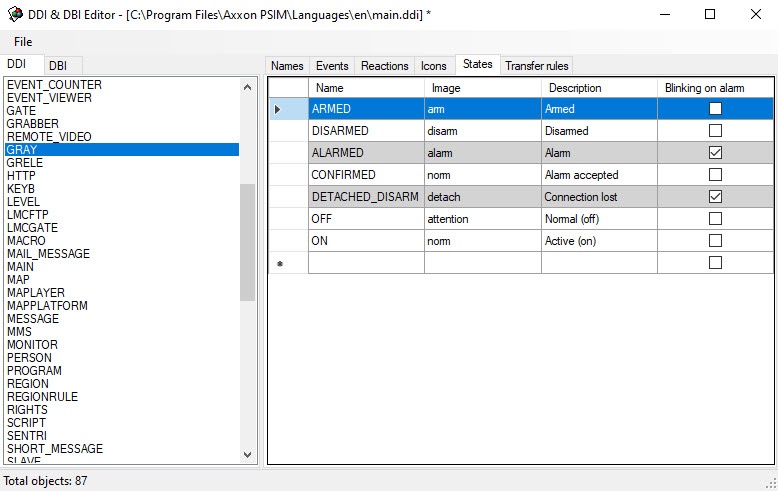
This tab contains the list of all possible states of the selected object.
The state properties:
- Name. State ID.
Image. The part of the name in the .bmp format displaying the given object state on the map. For example, if you specify the zone_fire file identifier on the Icons tab, and the image of the selected state is ARMED—arm, then the software searches for the zone_fire_arm.bmp file in the Bmp folder.
Also, you can specify the default icon for states. For this, set the def (By default) icon on the Icons tab. For example, if there is no zone_fire_arm.bmp icon for the ARMED state, then the def_arm.bmp icon is searched. This allows avoiding the duplication of icons if one state for the different types of the object icon must be displayed similarly.
Note
If you don't specify the file ID on the Icons tab, then the file name is comprised of the object ID and the part of the file name specified in the Image column.
Note
If the object is displayed on the map as a polygon, circle, or line, then you can set the color of these figures for each state. For this, specify the color in the R:G:B:A format after the icon name separated by the $ character in the Image column, or specify the color only in the specified format instead of the icon name. Here are the examples of the Image column contents:
255:0:0—the red color is set for the state;
alarm$255:0:0—icon and the red color are set for the state.
- Description. The short description of the state.
- Blinking on alarm. The option of displaying the object state—blinking on alarm.
Overview
Content Tools