
Go to documentation repository

Documentation for Axxon PSIM 2.0. Documentation for other versions of Axxon PSIM is available too.
Previous page Next page

Before you start creating the badge form, you must make sure that the Access Control Service object is created, as well as departments and users in Axxon PSIM.
To create the badge form of the Access Control Service program module, do the following:
- Select the section in the workspace where the interface elements are added. Each section represents a page.
- Create the required number of variables in the following way:
- Add a variable to the workspace using the
 button on the toolbar (1).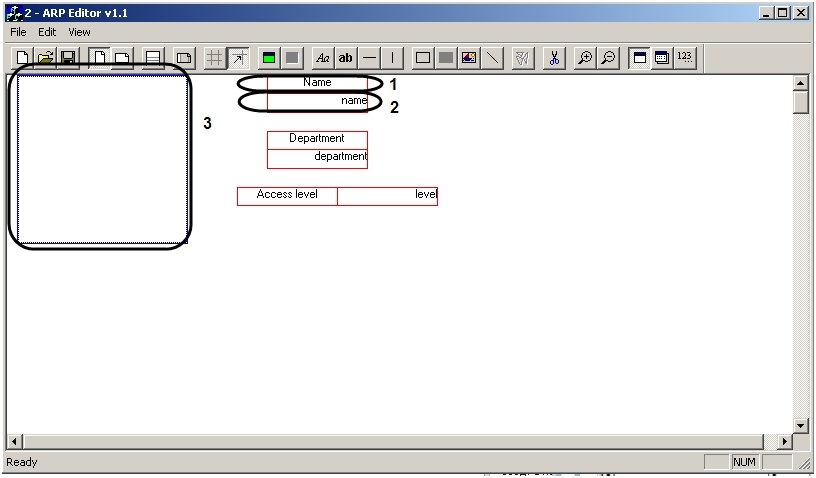
- Click the
 button on the toolbar.
 - Double-left-click the border of the Variable object that you want to set. The Field's options window opens.
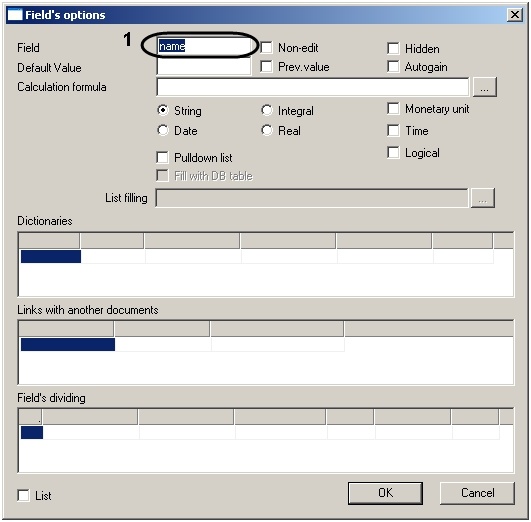
- In the Field field, enter the name of the variable corresponding to the dbo.OBJ_PERSON table field name in the PSIM database from which the variable value is taken for printing badges (1).
- Add a variable to the workspace using the
- Add the required design elements using the ArpEdit toolbar (see description below).
- If you want to print a photo of an employee to whom the badge belongs on each badge during printing, the Image object must be set in the following way:
- Select the required Image object and click the
 button on the toolbar. The Field's options window opens.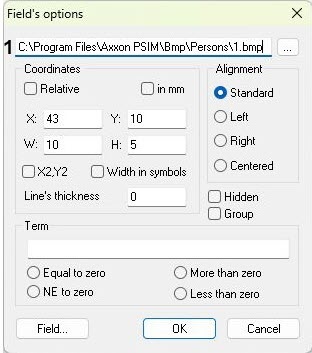
- In the Field’s options window, specify the following string: “<Axxon PSIM installation directory>\bmp\Person\”+id+”.bmp” (1). When you print badges, the id parameter is automatically read from the database, and a photo that is assigned to the user in Axxon PSIM is printed on their badge.
- Select the required Image object and click the
Design elements used for badge forms:

Name | Description | Function |
Text | Uneditable text field | Display the uneditable text information |


Name | Description | Function |
Line | Line of the set length and direction | Design element |

Name | Description | Function |
Frame | Rectangular frame of the set size | Design element |

Name | Description | Function |
Square | Filled rectangle of the set size | Design element |

Name | Description | Function |
Image | Image placed at the specified address | Insert user photos in the badge form for printing |
After you add all the required elements in the workspace, you must set the object display variables (see section on Setting object display parameters).
Creating the badge form is complete.
Overview
Content Tools