
Go to documentation repository

Documentation for Axxon PSIM 2.0. Documentation for other versions of Axxon PSIM is available too.
Previous page Next page

To configure NTP synchronization:
- On the Programming tab, select the Security zone object.
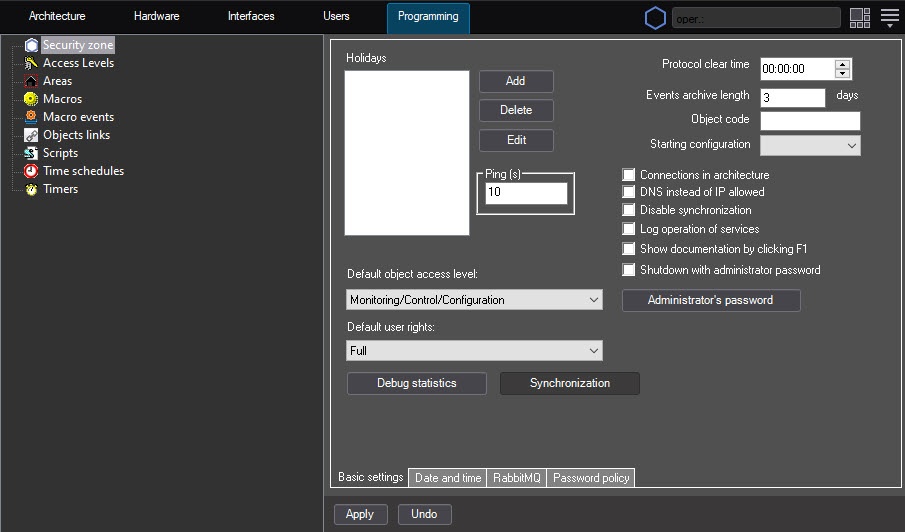
- Go to the Date and time tab.
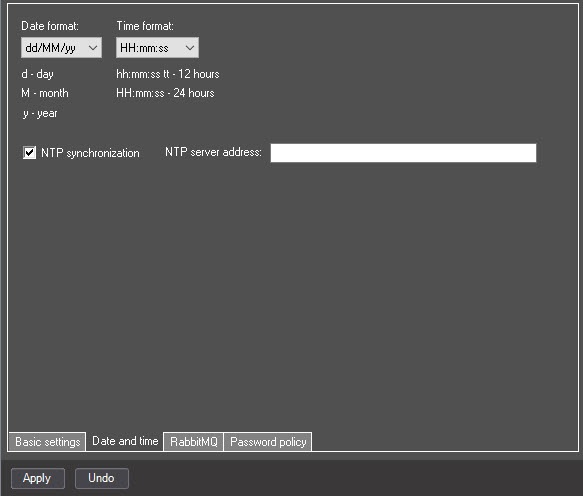
- Set the NTP synchronization checkbox.
- Specify the NTP server address.
- Click the Apply button.
Configuration of NTP synchronization is complete.
The system can display the problems with server connection in the following ways:
 —the server is connected but not synchronized (time is off by more than a minute in either direction).
 —the connection failed for some reason.
 —if the connection process takes a long time.
Attention!
If there is a server-remote client configuration, and you don't use the remote client as a client, such a workstation is always displayed as in the object tree because the remote client doesn't have a core. If you set the Use as client checkbox and start the remote client, it is displayed in the object tree correctly.
Note
You can use the parameter (30 seconds by default) of the MaxTimeDesyncReauthDelay key of the registry HKEY_LOCAL_MACHINE\SOFTWARE\AxxonSoft\PSIM\ to specify the time in seconds allowed between the first attempt of a client that is not synchronized by time to connect to the server and the second attempt to connect to the server with a special token (see Registry keys reference guide).
Overview
Content Tools