
Go to documentation repository


You can manage the inputs of the AIO-168 security panel in the Map interactive window using the function menu of the Apollo AIO Input object.
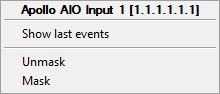
Description of the commands is given in the table.
| Command | Function |
|---|---|
| Unmask | Cancel masking |
| Mask | Apply masking to input (so that events from the input do not show in Event Viewer) |
If the input is unmasked, its state is shown on the map as follows:
| Green | Not active |
| Red | Active |
If the input is masked, its state is shown on the map as follows:
| Gray | Not active |
| Blue | Active |
Overview
Content Tools