
Go to documentation repository

Previous page Next page

The Optex Sensor is managed in the Map interactive window using the Optex Sensor object functional menu:
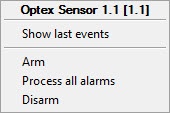
The Optex Sensor object functional menu commands description is given in the table.
Menu command | Function performed |
| Arm | The sensor is armed |
Process all alarms | The alarms from all the sensor's areas are processed |
| Disarm | The sensor is disarmed |
The Optex Sensor can have the following states:
| Disconnected |
| Tampering |
| Alarm in the area |
| Alarm in the area (old) |
| Dustiness |
| Weather detection disabled |
| Sensor failure |
| Normal state |
| Disarmed |
Overview
Content Tools