
Go to documentation repository

Previous page Next page

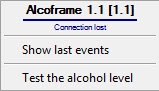
The Alcoframe breathalyzer is managed in the Map interactive window using the Alcoframe object functional menu:
Note
To open the object functional menu, right-click the object’s icon.
The Alcoframe object functional menu commands description is given in the table.
Menu command | Function performed |
|---|---|
| Test the alcohol level | The alcohol level check is activated |
As the result of testing the alcohol level, the following events are possible:
- Alcohol level is normal;
- Alcohol level is exceeded;
- Analysis error;
- Mirrors are dirty.
The Alcoframe object can have the following states:
| Disconnected |
| Connected |
| Waiting for exhalation |
| Breathalyzer body temperature is over the limit |
| Environment temperature is over the limit |
| Linewidth loss |
| Mirror error |
| Laser error |


Overview
Content Tools