
Go to documentation repository

Previous page Next page

The Nedap AEOS door is managed in the Map interactive window using the AEOS Door object functional menu:
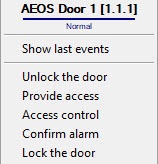
The Nedap AEOS object functional menu commands description is given in the table.
Menu command | Function performed |
|---|---|
| Unlock the door | Door is unlocked |
| Provide access | Access is provided |
| Access control | Ability to exit during the door unlock time is provided |
| Confirm alarm | Alarm is confirmed |
| Lock the door | Door is locked |
The Nedap AEOS door object can have the following states:
| Alarm |
| Connection dropped |
| The door is locked |
| Normal |
| Active unlock output during unlock time |
| The door is unlocked |


Overview
Content Tools