
Go to documentation repository

Previous page Next page

The Symmetry Output is managed in the Map interactive window using the Output object functional menu:
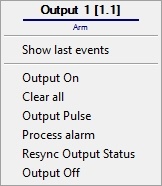
The Symmetry Output object functional menu commands description is given in the table.
Menu command | Function performed |
|---|---|
| Output On | Enable the output |
| Clear all | Clear all alarms |
| Output Pulse | Enable the impulse |
| Process alarm | Confirm the alarm |
| Resync Output Status | Synchronize the output status |
| Output Off | Disable the output |
The Symmetry Output object can have the following states:
| Alarm |
| Arm |
| Secure Access or Output Off |
| Free Access or Output On |
| Grant Access or Output Pulse |


Overview
Content Tools