
Go to documentation repository

Previous page Next page

The Symmetry Panel is managed in the Map interactive window using the Panel object functional menu:
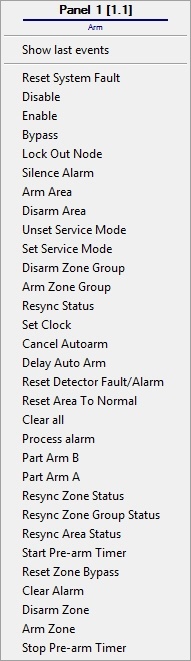
For details on the Symmetry Panel commands, see the official documentation for the system.
The Symmetry Panel object can have the following states:
| (M4000) Node Enclosure Tamper |
| (M4000) Node Fire Alarm Input |
| (M4000) Timed Out |
| (M4000) AC Power Fail |
| (M4000) Battery Fail |
| Node Time Codes > 95% Full |
| No Alarms being sent |
| AC Power Fail |
| Node Tamper |
| Alarm |
| Arm |


Overview
Content Tools