
Go to documentation repository

Previous page Next page

The Cerberus PRO sensor is managed in the Map interactive window using the CerberusPro Sensor object functional menu:
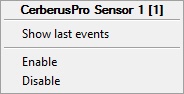
The Cerberus PRO sensor functional menu commands description is given in the table:
Menu command | Function performed |
|---|---|
| Enable | On |
| Disable | Off |
The Cerberus PRO sensor can have the following states:
| Optical detector | Temperature detector | MCP | Module | Signaller | Flap | Input | Bulb | Power supply | Valve | Icon set / State |
|
|
|
|
|
|
|
|
|
| Not started/Unknown |
|
|
|
|
|
|
|
|
|
| Active |
|
|
|
|
|
|
|
|
|
| Link lost/Offline |
|
|
|
|
|
|
|
|
|
| Normal |
|
|
|
|
|
|
|
|
|
| Pre-alarm |
|
|
|
|
|
|
|
|
|
| Alarm |
|
|
|
|
|
|
|
|
|
| Abnormal/disabled |
|
|
|
|
|
|
|
|
|
| Fault |


Overview
Content Tools