
Go to documentation repository

Previous page Next page

Operating the TREZOR-BL input board is performed in the Map interactive window using the BL Input (Trezor) object function menu.
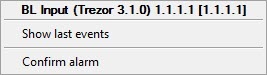
Commands to operate the TREZOR-BL input board are given in the table:
| Function menu command | Function |
|---|---|
Confirm alarm | Alarm confirmation by Operator |
The following TREZOR-BL input board displays are possible:
| Normal |
| Alarm |
| Inactive alarm |
| Channel failure Cable break |
| Channel disabled |
| Confirmed alarm |
Overview
Content Tools