
Go to documentation repository

Documentation for Monitoring PSIM 2.0 (english)
Previous page Next page

Interface elements of the Additional workplace configuration tool are described in the table.
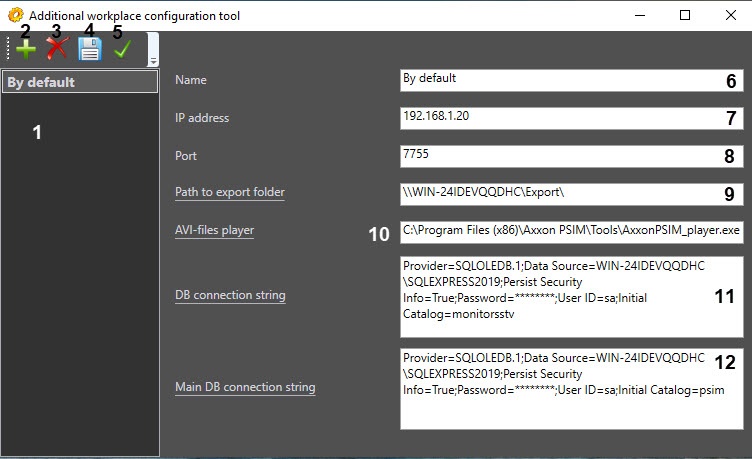
# | Name | Method of setting the parameter value | Default value | Description |
1 | List of servers | The Add, Remove and Set as active buttons | By default there is the server in the list. It is named By default and is created during installation | Displays the list of existing servers. An active server is highlighted in bold |
2 | The Add button | Click the button | NA | Adding a new server to the list |
3 | The Delete button | Click the button | NA | Deleting a selected server from the list |
4 | The Save button | Click the button | NA | Saving the changes |
5 | The Set as active button | Click the button | NA | Setting a selected server as an active one |
6 | The Name field | Enter a value in the field | See #1. When a new server is added to the list, it is named New by default | Setting a name for the server. This name is used only in this tool |
7 | The IP address field | Enter a value in the field | 127.0.0.1 Important! The value of this parameter is to be changed according to the IP address of the server | Setting the IP address to connect to the VideoSrv.exe module (if the Server of Control is added) or CentralNetServer.exe (if the Central Server of Control is added) |
8 | The Port field | Enter a value in the field | 7755 | Setting a port to connect to the corresponding communication module VideoSrv.exe/CentralNetServer.exe. To connect to the VideoSrv.exe module, it is necessary to specify the port that is selected in the TCP/IP port (Archive) field on the settings panel (see Configuring a connection). To connect to the CentralNetServer.exe module, you must specify the port that is selected in the IPPort parameter of the HKEY_LOCAL_MACHINE\SOFTWARE\Wow6432Node\BitSoft\VHOST\VHostService registry key (for details, see the registry keys reference guide Vertical solutions, for more information about working with the registry, see Working with Windows OS registry) |
9 | The Path to export folder field | The Path to export folder link or enter a value in the field | NA | Setting a path to the network folder on the server where there are archive files requested from the Agents of Control |
| 10 | The AVI-files player field | The Path to executable file link or enter a value in the field | NA | Setting the path to the executable file of the video player on the Additional worksplace/Additional workplace of CSC used to play back video clips requested from the Agents of Control (see Requesting video clips from objects) |
11 | The DB connection string field | The DB connection string link | NA | Setting the Server DB connection string. The Data Link Properties box appears when clicking the DB connection string link |
| 12 | The Main DB connection string field | The Main DB connection string link | NA | Setting the connection string to the base Axxon PSIM DB on the server. The Data Link Properties box appears when clicking the Main DB connection string link |
Overview
Content Tools