
Go to documentation repository

Documentation for Monitoring PSIM 2.0 (english)
Previous page Next page

To create a report of this group, click the Statistics by owners  button.
In the settings window that opens:
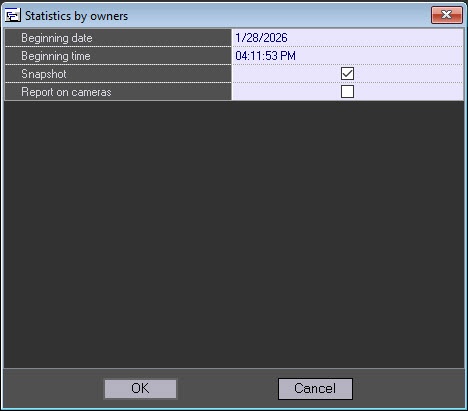
You can create three report types:
- The Statistics by owners report for the selected day.
- In the Beginning date field, specify the date at which a report is created.
- Clear the Snapshot checkbox. By default, the checkbox is set.
- Click the OK button.
A report is created for the entire selected day.
- The Statistics by owners report for the selected moment of time.
- In the Beginning date field, specify the date at which a report is created.
- In the Beginning time field, specify the report time in the HH:MM:SS format.
- Click the OK button.
Note
The Statistics by owners reports for the selected day and for the selected moment of time are created only by objects with the Owner field filled in the Monitoring objects reference documentation (see the Regulatory and reference information section).
- Report on cameras.
- Set the Report on cameras checkbox. By default, the checkbox is cleared.
- Click the OK button.
As a result, a report on cameras at the current moment is created.
The following figure shows the example of the statistical report by owners for the selected day.
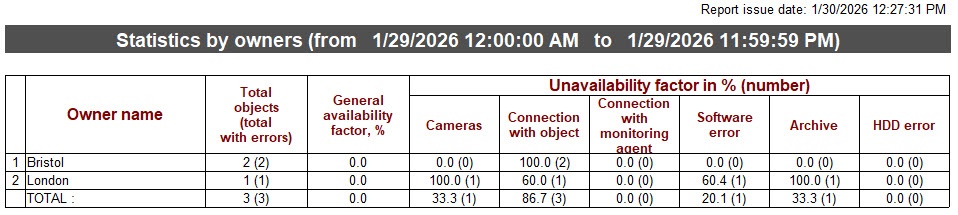
The example of creating the statistical report by owners for the selected moment of time.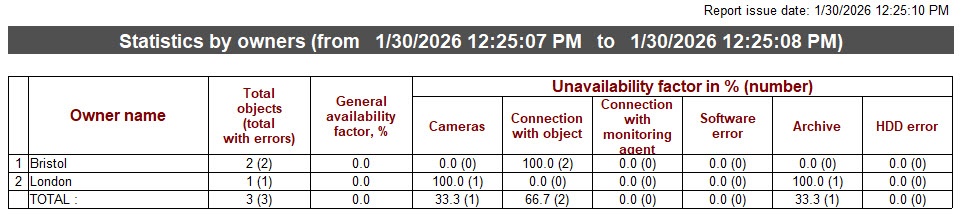
The example of creating a report by cameras.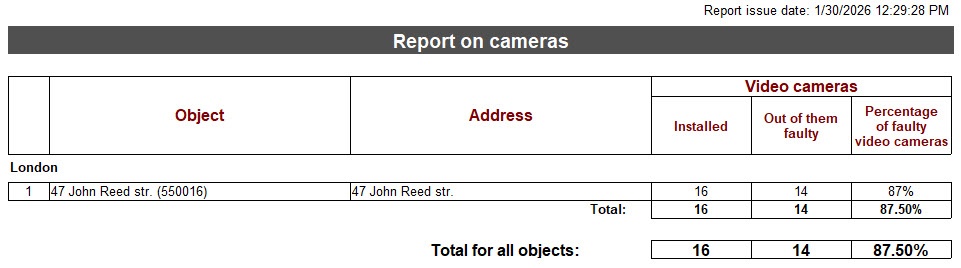
Creating reports of the Statistics by owners group is complete.
Overview
Content Tools