
Go to documentation repository
Documentation for Axxon One 2.0 version. Documentation for Axxon One 3.0 version is also available.

Axxon One uses the Event source object to get events from external systems. To create the object, do the following:
- Go to the IP Device Discovery Wizard on the Devices tab (see Searching, adding, configuring, and removing IP devices).
- In the form for manually adding a device in the Device type field, select Event source from the drop-down list.

- In the Vendor field, select the required manufacturer of the device from the drop-down list.
- Click the
 button.
The Event source object is added to the system.
Note
Once created, the Event source object is enabled by default. To disable it, set the No value in the Enable parameter.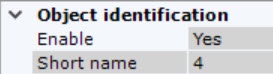
Overview
Content Tools