
Go to documentation repository
Documentation for Axxon One 2.0 version. Documentation for Axxon One 3.0 version is also available.

Hardware requirements for neural analytics operation
Hardware requirements for the License plate recognition IV
Video stream and scene requirements for the License plate recognition IV and its sub-detectors
Image requirements for the License plate recognition IV and its sub-detectors
Activating the license for the License plate recognition IV in Windows OS
Activating the license for the License plate recognition IV in Linux OS
Examples of macros used when working with lists of license plates
Attention!
For the License plate recognition IV to work, you must activate the license (see Activating the license for the License plate recognition IV in Windows OS, Activating the license for the License plate recognition IV in Linux OS).
To configure the License plate recognition IV detector, do the following:
- Go to the Detectors tab.
- Below the required camera, click Create… → Category: Vehicle → License plate recognition IV.
By default, the detector is enabled and set to recognize vehicle license plates.
If necessary, you can change the detector parameters. The list of parameters is given in the table:
| Parameter | Value | Description |
|---|---|---|
| Object features | ||
| Check in lists | Yes | The parameter is disabled by default. If you want to use this detector to check in lists of vehicle license plates, select the Yes value (see Checking in lists of LPs) |
| No | ||
| Record objects tracking | Yes | The metadata of the video stream is recorded to the database by default. To disable the parameter, select the No value |
| No | ||
| Video stream | Main stream | If the camera supports multistreaming, select the stream for which detection is needed. Selecting a low-quality video stream reduces the load on the server |
| Second stream | ||
| Other | ||
| Enable | Yes | The detector is enabled by default. To disable the detector, select the No value |
| No | ||
| Name | License plate recognition IV | Enter the detector name or leave the default name |
| Decoder mode | Auto | Select a processing resource for decoding video streams. When you select a GPU, a stand-alone graphics card takes priority (when decoding with Nvidia NVDEC chips). If there is no appropriate GPU, the decoding will use the Intel Quick Sync Video technology. Otherwise, CPU resources will be used for decoding |
| CPU | ||
| GPU | ||
| HuaweiNPU | ||
| Period of ignoring repeated recognitions (sec) (starting with Detector Pack 3.14) | 0 | Specify the period in seconds during which re-recognized license plates are ignored. The value must be in the range [0, 86400] |
| Type | License plate recognition IV | Name of the detector type (non-editable field) |
| Advanced settings | ||
| Frame size change | 1920 | The analyzed frames are scaled down to a specified resolution (1920 pixels on the longer side) by default. The following algorithm is used:
Note For example, the source image resolution is 2048*1536, and the specified value is set to 1000. In this case, the source resolution will be halved two times (512*384), as after the first division, the number of pixels on the longer side exceeds the specified value (1024 > 1000). If detection is performed on a higher resolution stream and detection errors occur, we recommend reducing the compression. |
| GDPR policy | - | By default, on the layout and in the archive, the characters of a license plate are completely hidden "GDPR ON". To display the characters of a license plate, you must enter a value:
|
| Initiate event in (sec) | 1 | Set a delay (in seconds) before the event generation after the first license plate recognition. During this time, the detector accumulates and analyzes frames with the license plate to select the best recognition.
Recommendations for value selection depend on the movement direction:
This parameter is also useful in the scripts where one object temporarily overlaps another one: a delay allows waiting for the moment when the license plate becomes visible and avoiding the earlier event generation upon the partially closed license plate |
| Maximal number of characters in LP | 10 | Specify the maximum number of characters in the license plate. The value must be in the range [1, 20] |
| Minimal number of characters in LP | 5 | Specify the minimum number of characters in the license plate. The value must be in the range [1, 20] |
| Minimum recognition quality, in % | 80 | Specify the minimum quality of license plates recognition as a percentage. The higher the minimum recognition quality, the fewer false events. The value must be in the range [0, 100] |
| Track retention time (sec) | 3 | Specify the time in seconds during which the vehicle track is saved after the license plate is no longer recognized (for example, due to overlapping or exiting a frame). After this time, a track is considered lost. The value must be in the range [0, 3600]. |
| Basic settings | ||
| Algorithm for detecting vehicle direction | By LP coordinates | The By LP coordinates algorithm is used by default. It works as follows: if the coordinates of the vehicle license plate shift from top to bottom (the vehicle moves towards the camera) and if the coordinates of the vehicle license plate shift from bottom to top (the vehicle moves away from the camera). |
| By LP scale change | ||
| Direction of movement (starting with Detector Pack 3.14) | Both | By default, an event is created when a vehicle moves in Both directions. If you want the event to be created when a vehicle moves from the camera (Outgoing) or to the camera (Incoming), select the corresponding value |
| Outgoing | ||
| Incoming | ||
| Maximum LP width | 10 | Specify the maximum and minimum width of the license plate as a percentage according to the actual size of the license plate in the frame. The value must be in the range [0, 100]. Attention!
|
| Minimum LP width | 1 | |
| Detection mode | CPU | Select a processor for the detector operation (see Selecting Nvidia GPU when configuring detectors). Attention!
|
| Nvidia GPU 0 | ||
| Nvidia GPU 1 | ||
| Nvidia GPU 2 | ||
| Nvidia GPU 3 | ||
| Country selection | ||
| Country name |
| Select from the list the country whose license plates you want to recognize and select the recognition accuracy:
|
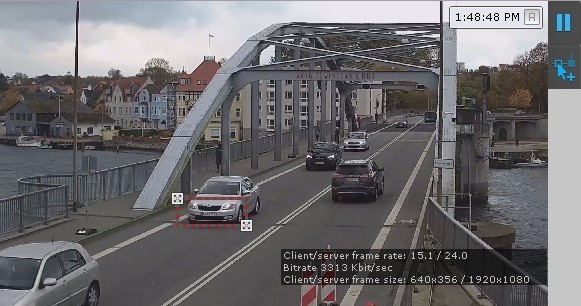
In the window, specify the area in which license plate detection and recognition will be performed. You can adjust the area by moving the anchor points  .
.
Note
- For convenience of configuration, you can "freeze" the frame. Click the
 button. To cancel the action, click this button again.
 - The detection area is displayed by default. To hide it, click the
 button. To cancel the action, click this button again.
To save the parameters of the detector, click the Apply  button. To cancel the changes, click the Cancel
  button.
Configuration of the License plate recognition IV is complete. If necessary, you can create and configure the necessary sub-detectors on the basis of the License plate recognition IV (see Standard sub-detectors).
Overview
Content Tools