
Go to documentation repository
Documentation for Axxon One 2.0 version. Documentation for Axxon One 3.0 version is also available.

You can log the Client memory usage at specified intervals (AxxonOne.exe process). To do this:
- Stop the Axxon One Client (see Stop the client).
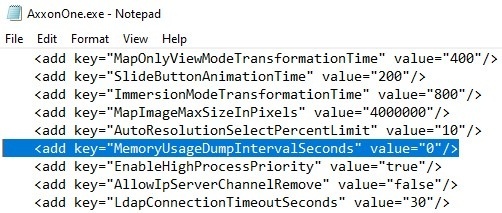
- Open the AxxonOne.exe.config configuration file, located in the <Axxon One installation folder>\bin, in a text editor.
Find the MemoryUsageDumpIntervalSeconds parameter and set a value for it, corresponding to the period of adding the information to the log in seconds.
Note
The 0 value—no information is logged.
- Save the changes to the file.
- Start the Axxon One Client (see Starting the client).
Here is an example of the Client memory usage information in the log:
*** Memory usage: ***
    Private size  425 MB
    Working set   404 MB
where:
- Private size is the amount of reserved memory.
- Working set is memory usage.
Overview
Content Tools