
Go to documentation repository
Previous page Next page
You must configure the video player to:
To configure the video player:
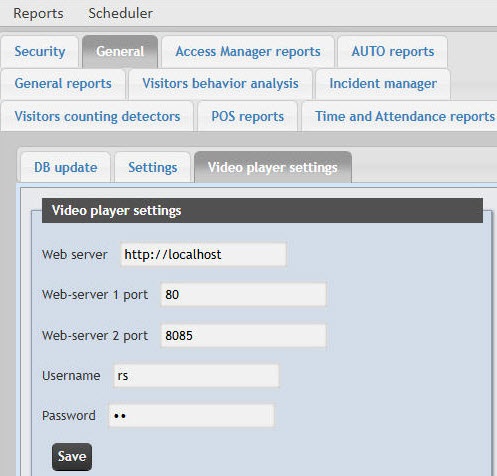
In the Web-server 1 port field, enter the port for connecting to the HTTP server that is specified on the settings panel of the Web-server object (see Parameters of connecting clients to the Web-server). This port is used to receive frames from the camera required for some reports: POS reports, report by employee passes with photo, protocol report with the Report with video checkbox set.
In the Web-server 2 port field, enter the port for connecting to the HTTP server of the Web Server 2.0 object (see Network settings of the Web Server 2.0 module). This port is used to receive video and intervals for the video player.
Note
If the Web-server module is configured on the same server where the WEB Report System PSIM is installed, then the values in the Web-server 1 port and Web-server 2 port fields are filled in automatically after you restart the Cassini Service.
The video player is configured.

