
Go to documentation repository
Previous page Next page
The Employee details (full report) is a report in the form of a table that provides information about entries and exits to different areas of one or several employees, or all employees of the selected department, for a specified time period.
The Employee details (full report) is a variant of the Employee details report. You can create the Employee details (full report) using the same data.
Note
To enable the report, set the value of the EnableAboutUsersFullReport key to true (see Enabling the Employee details (full report)) and give the selected user the access rights to this report (see Setting up user access to Time and Attendance reports).
The Employee details (full report) looks like this.
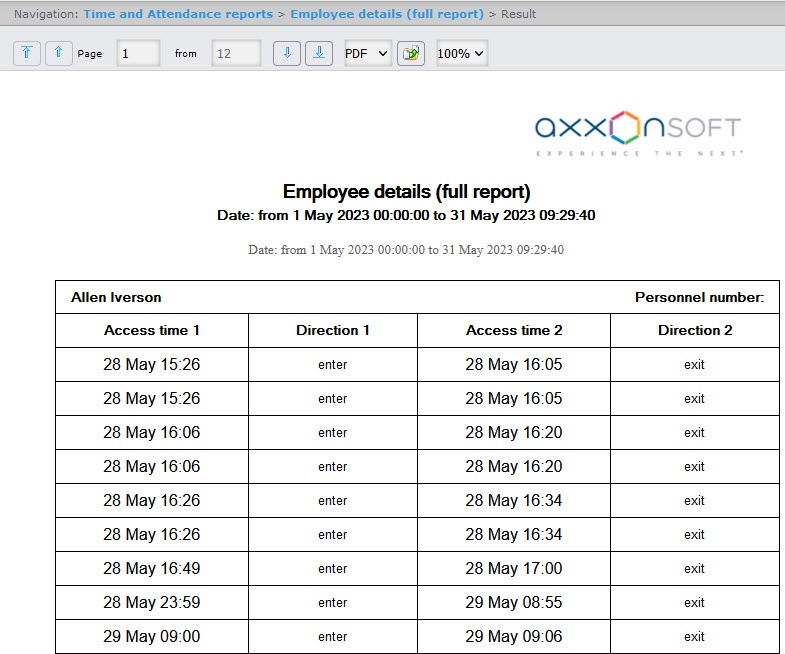
If an employee entered the first area after the start date of the reporting period, the report displays the data in the order, as shown in the figure above: enter (the Direction 1 column)—exit (the Direction 2 column).
If an employee entered the first area before the start date of the reporting period, the report displays the data in the order, as shown in the figure below: exit (the Direction 1 column)—enter (the Direction 2 column).
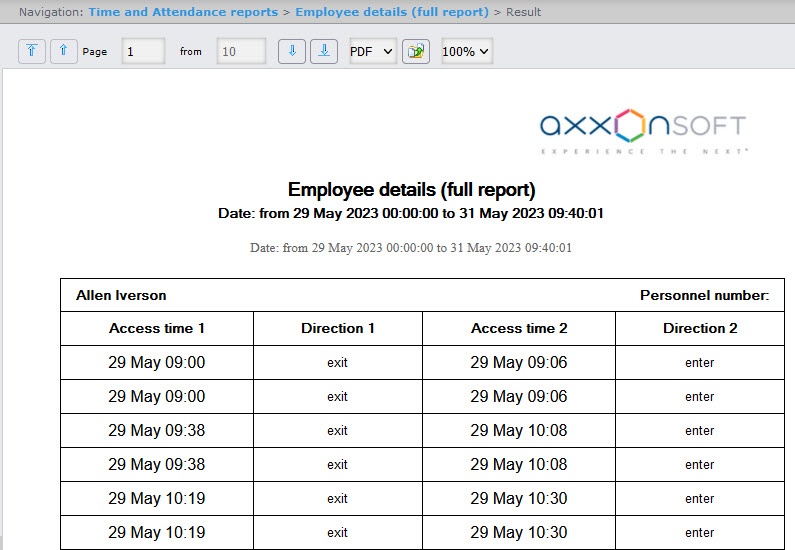
The fields of the report are described in the table.
| Field name | Description |
|---|---|
| Access time | Date and time of the employee access |
| Direction | Direction of the employee movement |
| The Employees in total line displays the number of employees included in this report | |

