
Go to documentation repository

Documentation for Axxon PSIM 2.0. Documentation for other versions of Axxon PSIM is available too.
Previous page Next page

Depending on the requirements for the security system built on Axxon PSIM, you must configure objects corresponding to the following components of the security system:
- Video subsystem.
- PTZ subsystem (system for managing pan/tilt/zoom devices and cameras’ lenses).
- Audio subsystem;
- Subsystem of automatic audio/video data analysis.
- Sensor/relay subsystem.
- Notification subsystem (via various communication channels).
- Backup subsystem.
- Subsystem of audio/video data exchange via the network.
- User rights management subsystem.
- Software performance monitoring subsystem.
- Automated control subsystem.
- User interface subsystem.
Note
The set of objects available for use in Axxon PSIM is predetermined by the psim.sec key file.
You can configure the Axxon PSIM objects in the System settings window that you can open using the quick access toolbar from the Windows notification area (system tray) or by briefly pressing the F8 key.
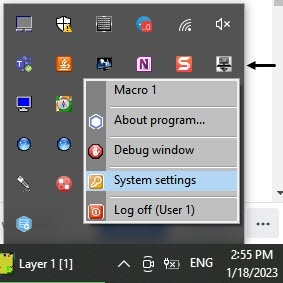
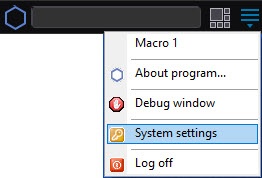
The System settings dialog window contains main interface elements:
- The tabs panel.
- The object tree (is absent on the Architecture tab).
- The object settings panel (is absent on the Architecture tab).
- The Apply and Undo buttons.
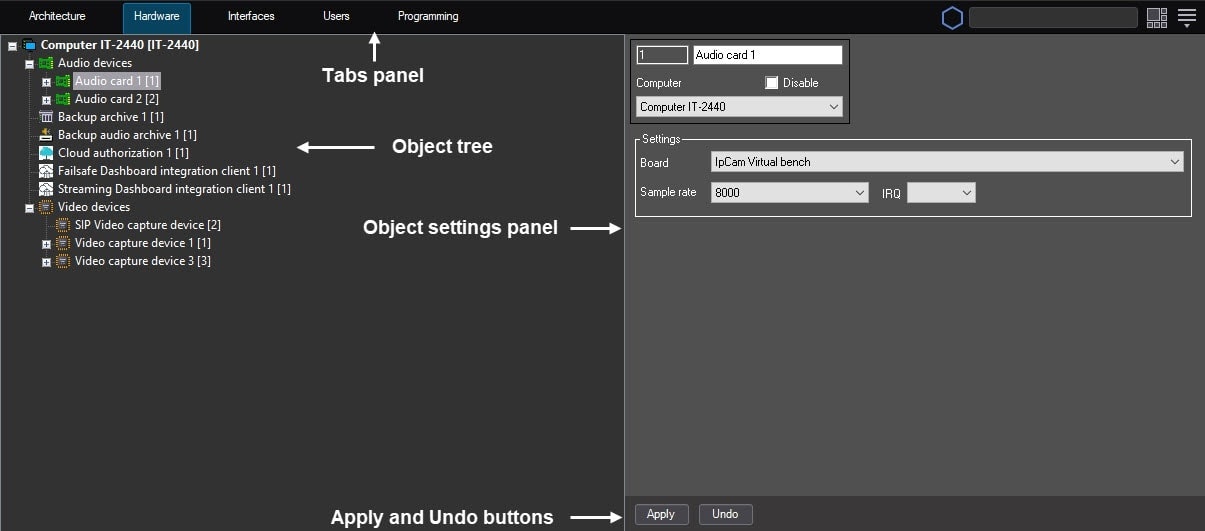
You can configure objects using the standard way: create or select the object required for configuration in the object tree, set parameter values on the object settings panel, and save changes using the Apply button. The quick start guide only provides lists of Axxon PSIM objects with the brief description of their functionality. For details on configuring objects, see Administrator's Guide.
Overview
Content Tools