


To configure the door of the ZKTeco PUSH SDK integration module, do the following:
- Go to the settings panel of the Door ZK PUSH object that is created automatically when you download the configuration on the basis of the ZK PUSH Controller object of the ZKTeco PUSH SDK integration module (see Configuring the object of the ZKTeco PUSH SDK integration module).
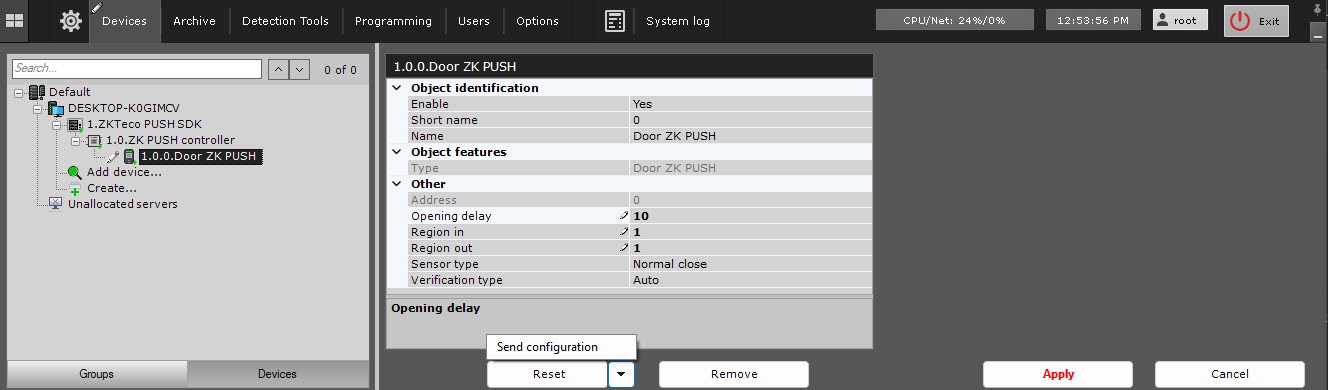
- In the Opening delay field, enter the time interval in seconds during which the door remains open after user verification. The default value is 0.
- From the Region in drop-down list, select the region on the exit side of the door.
- From the Region out drop-down list, select the region on the entry side of the door.
- In the Sensor type field, select the contact status of the door position sensor:
- None
- Normal open
- Normal close (default).
- In the Verification type field, select the type of user verification:
- Auto (default)
- Fingerprint
- User ID
- Password
- Card
- Fingerprint or password
- Fingerprint or card
- Card or password
- User ID + fingerprint
- Fingerprint + password
- Card + fingerprint
- Card + password
- Fingerprint + password + card
- User ID + fingerprint + password
- User ID + fingerprint or card + fingerprint
- Face
- Face + fingerprint
- Face + password
- Face + card
- Face + fingerprint + card
- Face + fingerprint + password
- Finger vein
- Finger vein + password
- Finger vein + card
- Finger vein + password + card
- Other
Click the Apply button to save the settings.
- To send the updated configuration to a device, click the
 button and select Send configuration.
 - Click the Apply button.
Configuration of the door of the ZKTeco PUSH SDK integration module is complete.
Overview
Content Tools