
Go to documentation repository

Documentation for Axxon PSIM 2.0. Documentation for other versions of Axxon PSIM is available too.
Previous page Next page

Map allows monitoring security system devices (cameras, microphones, sensors, relays, and so on) and controlling them, as well as executing macros.
Map solves the following user tasks:
- Creating the multilevel interactive map (graphical chart) of the protected facility.
- Interactive monitoring of the status of all system devices.
- Relative delineation of the protected facility into areas and regions.
- The ability of auto-switching and searching for recursive alarm links between layers.
- Managing executable system devices.
- Executing macros.
The map view depends on the chart of the protected facility and is specified during the Axxon PSIM configuration.
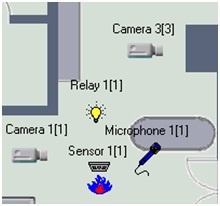
Security system devices are displayed on the map as characters. The status of each device is displayed, and you can access its functions through the device functional menu that you can open by right-clicking the device icon on the map.
Map can contain multiple layers (levels). In this case, use the map layer link icon  to switch between map layers.
Overview
Content Tools