
Go to documentation repository


The "Hot record" time mode is a mode in which the video is recorded to the archive during the specified time with the set frame rate.
Note
The "hot record" time mode setting is invalid if you create the Camera object based on the Video capture device object that uses the H264, MPEG4, or H265 codec.
By default, this mode is disabled: when an alarm is detected, the video is recorded at the frame rate specified in Recording frame_fps (see Setting video stream frame rate) or at the default rate if the Recording frame_fps parameter isn't specified.
To enable the "Hot record" time mode, do the following:
- Go to the Hardware tab in the System settings window.
- Select the Camera object corresponding to the adjusted camera in the object tree.
- Select the Basic settings tab on the settings panel of the Camera object.
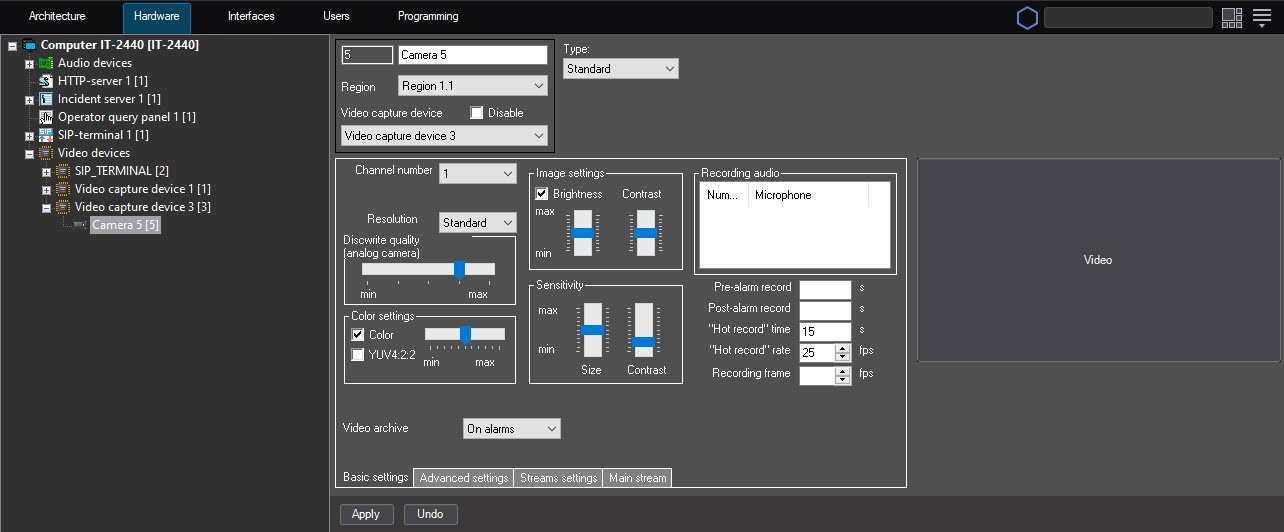
- In the "Hot record" rate_fps field, specify the frame rate with which the archive is recorded when the alarm occurs. The value of this parameter mustn't exceed the value of the frame rate with which the video signal is digitized.
In the "Hot record" time field, specify the duration of recording with the "hot" frame rate.
Note
If the event with the end of the alarm appears in the system during continuous recording to the camera in "hot" recording mode, the archive is recorded at the "hot" recording rate until the specified time interval expires.Note
Example.
Recording frame_fps = 10 fps, "Hot record" rate_fps = 25 fps, "Hot record" time = 15 fps.
With these settings, the continuous recording to the archive is performed at 10 fps, and during the 15 seconds after the alarm occurs, the recording is performed at 25 fps.
- Click the Apply button.
Note
If you set the non-zero or non-empty value of the Recording frame_fps parameter when you use the H.264 codec, the archive is recorded only by key frames. When you use the "Hot record" rate_fps parameter for the H.264 codec at a time, the recording to the archive is performed by key frames too. If you set the Recording frame_fps parameter to 0 or don't set it, all frames are recorded to the archive.
Configuring video in the "Hot record" time mode is complete.
Overview
Content Tools