
Go to documentation repository

Documentation for Axxon PSIM 2.0. Documentation for other versions of Axxon PSIM is available too.
Previous page Next page

You can create the Sensor system object on the basis of the Video capture device object.
To create and configure the main parameters of the Sensor object, do the following:
- Go to the Hardware tab of the Axxon PSIM settings panel (1).
- Create the Sensor system object on the basis of the Video capture device object or select the corresponding object in the object tree on the Hardware tab of the Axxon PSIM settings panel (2).
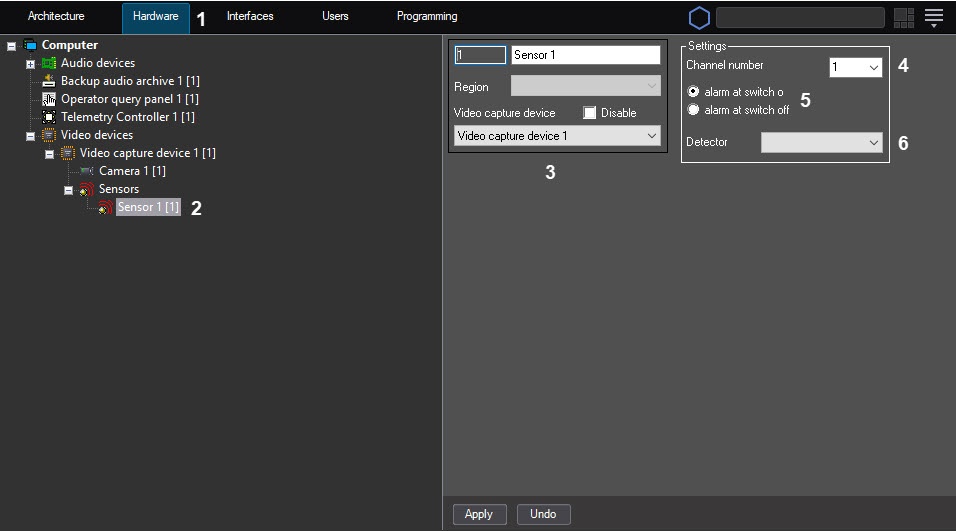
When you create the Sensor object (3), you must specify the ID, the name of the object and select the Video capture device object based on which the Sensor object is created.
Note
If you use the sensor-relay card, then in the Sensor object settings, you must specify the video capture card on the ADC of which the sensor-relay card is installed.
Select the channel number in accordance with the number of the output connector to which the sensor is connected physically (4).
In the group of switches, select the mode at which the sensor generates an event: at switch on or at switch off. By default, the alarm at switch on mode is selected (5).
The executive device corresponding to the Sensor system object operates in one of two modes: alarm at switch on or alarm at switch off.Note
Sensors connected to Panasonic IP-devices of the i-Pro series generate an event only at the switch off event.
For example, when you select the alarm at switch off mode for the executive device of the Sensor type, the normal state of the sensor is switch on. When you switch it off, the sensor generates an event, and the actions set in Axxon PSIM are eventually performed.
- In the Detector drop-down list, select the type of executive device that is used as a sensor on the protected facility (6).
The Detector parameter is used for selecting the icon that is displayed on the interactive map. This parameter is required for the better perception of information by the operator that is displayed on the Map as object icons, as well as for the rapid operator reaction if such is required. - Types of detectors available for the Sensor system object are given in the table.
Hardware
Description
Infrared
The icon of the interactive map for the motion detector
PIR
The icon of the interactive map for the device installed on the ceiling of the protected facility
Glass
The icon of the interactive map for the device installed on the window of the protected facility and responding when the window is broken
Fire
The icon of the interactive map for the device responding to the heat condition changes at the protected facility
Window
The icon of the interactive map for the device installed at a distance from a window and responding when the window is broken
Smoke
The icon of the interactive map for the device responding to the smoke appearance at the protected facility
Reed switch
The icon of the interactive map for the device that responds to locking/unlocking a window, door, and so on
- Click the Apply button to save the changes.
After you create the sensor in the objects tree, it is in the "Armed" state. To change the sensor state, use a macro (see the Creating and using macros section) or control the sensor from the map (see the Configuring the interactive map for object state indication and controlling the objects and Operations with sensors sections). If you arm the sensor, the "Alarm" event appears when you switch on/switch off the sensor depending on the alarm mode setting—see step 5 above. If you disarm the sensor, the "Switch off"/"Switch on" events appear correspondingly.
Note
Axxon PSIM requests the sensor state three times per second. Short-term event generations that last for less than 1/3 of a second can be skipped.
Creating and configuring the connection channel of the Sensor object is complete.
Overview
Content Tools