
Go to documentation repository
Documentation for Axxon One 3.0/3.1 version. Documentation for Axxon One 2.0 version is also available.

You can use the Network settings utility to specify:
- IP address or DNS name of the router if the server is behind NAT,
- port range for operation of the Axxon One server,
- a mask/masks of available servers in the list of Axxon One servers.
To configure network settings, do the following:
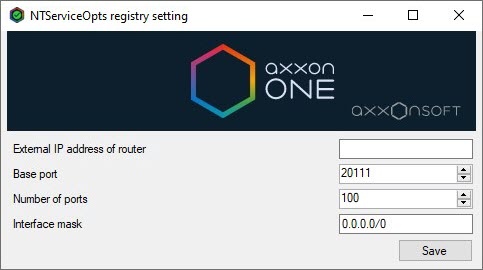
- Start the Network settings utility from the Windows Start menu: Start → All Programs → Axxon One → Utilities → Network settings.As a result, the NTServiceOpts registry setting window opens:
Note
The NTServiceOpts.exe executable file of the Network settings utility is located in the <Axxon One installation folder>\AxxonSoft\Axxon One\bin\ folder.
Note
In Linux OS, you can perfom actions in this utility using the command (see Changing the configuration of the Axxon One Server in Linux OS):
sudo dpkg-reconfigure axxon-one
- In the External IP address of router field, enter the external IP address or DNS name of the router if the Server is located behind NAT.
Note
You can specify multiple interfaces in the following format: "IP Address1 or DNS Name1, IP address2 or DNS Name2".
For example: 88.78.12.33, ExampleAxxon.ddns.net. - Specify the port range for operation of the Axxon One server:
- In the Base port field, enter the start port of the range.
- In the Number of ports field, enter the number of ports in the range. The minimum possible number of ports in the range is 20.
Attention!
- The port ranges of domain servers must not overlap.
- The number of ports that you select determines the maximum operating configuration of the system. When specifying the number of ports, refer to the following information:
Number of ports Purpose 6 Used for Axxon One operation (see Ports used by Axxon One) 6 Used for any number of cameras in 64-bit configuration (see Camera) 2 Used to record to the archive (see Configuring recording to an archive) 1 Used to use the metadata database (see Metadata database) 2 Used to use the Service detectors (see Category: Service) 2 Used to use the standard sub-detectors (see Standard sub-detectors) 1 Used to use E-mail notification (via the SMTP service, see Email notifier) or server audio notification (see Speaker)
- In the Interface mask field, enter a mask/masks of available servers in the list of Axxon One servers (see Server). Possible values:
- 0.0.0.0/0—servers from all networks are available.
- 10.0.1.23/32,192.168.0.7/32—only servers from the specified networks are available.
- 127.0.0.1—only servers from the local network are available.
- Click the Save button.
Note
To close the NTServiceOpts registry setting window, click the
 button.
Configuration of the network settings is complete. The Axxon One server restarts automatically (see Start and stop Axxon One).
Overview
Content Tools