
Go to documentation repository

Documentation for Axxon PSIM 2.0. Documentation for other versions of Axxon PSIM is available too.
Previous page Next page

To configure the SIP-device of the Axxon PSIM SIP client, do the following:
- In the User ID field (1), specify the SIP-device identification number, that is, the number to call it.
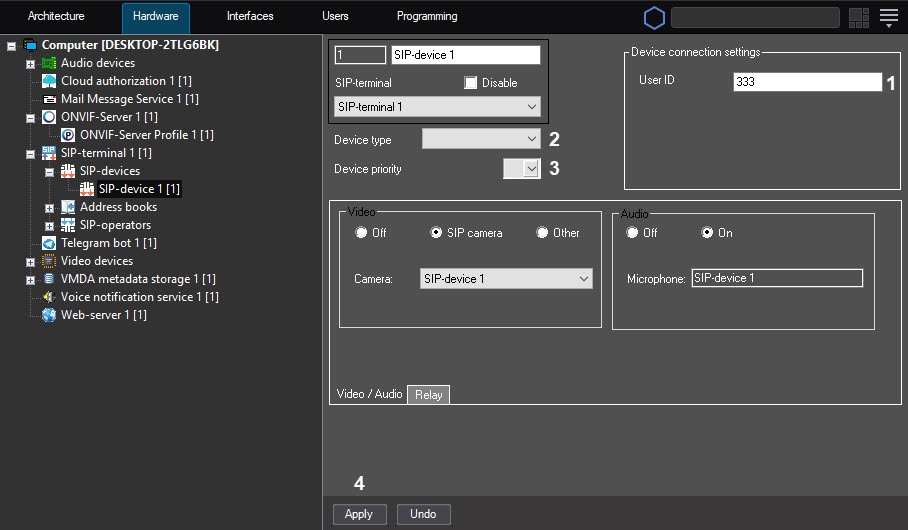
- From the Device type drop-down list (2), select the icon type used to display a device on the Map.
- From the Device priority drop-down list (3), select the priority of calls from this device in the SIP panel window of incoming calls. The lower the number, the higher the priority, and, hence, the higher the call is displayed in the list. If you leave the field blank, the priority is considered minimal. Calls from devices with the same priority are sorted by the time of the call occurrence.
- Click the Apply button (4).
Note
The Video / Audio and Relay tabs are designed for configuring the SIP-device only for the SIP server terminal type (see Configuring SIP-device of the Axxon PSIM SIP server).
Configuring the SIP-device of the Axxon PSIM SIP client is complete.
Overview
Content Tools