
Go to documentation repository

Documentation for Axxon PSIM 2.0. Documentation for other versions of Axxon PSIM is available too.
Previous page Next page

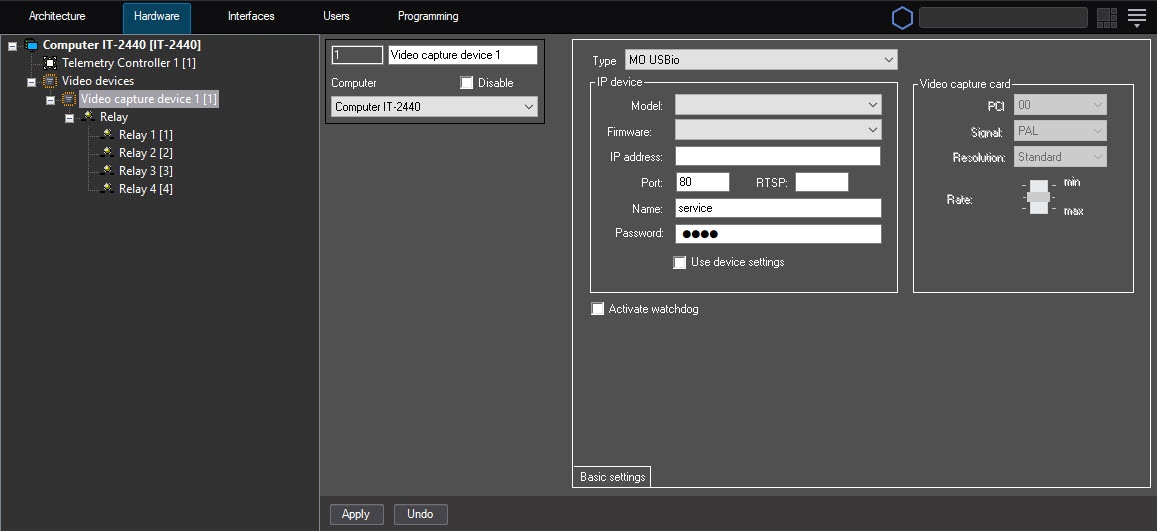
The Relay objects corresponding to relays connected to the MO USBIO 4x4 device are created in the hardware tree based on the Video capture device object with the MO USBio type. You can create up to four Relay objects based on the Video capture device parent object.
Note
In the settings of the Video capture device object, you must specify the number of the PCI channel that isn't used by another object.
When you configure the Relay objects in Axxon PSIM, you must specify the channel numbers of the relay connection to the MO USBIO 4x4 device. The channel numbers are allocated in accordance with the external pinout of the device (see the Connecting MO USBIO 4x4 external module or the Connecting MO USBIO 4x4 cards sections).
To change the channel numeration, use the Channel number list on the settings panel of the Relay object.
When you use the MO USBIO 4x4 device, up to four relay connection channels are available according to the configuration of the license key file.
The figure shows an example of allocating the channel numeration of four relays connected to one MO USBIO 4x4 device.
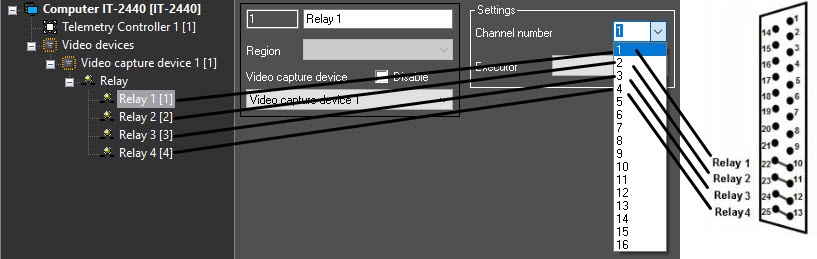
For the second and the next device, the allocation of channel numbers is also performed in the range 1—4.
Overview
Content Tools