
Go to documentation repository
Documentation for Axxon One 3.0 version. Documentation for Axxon One 2.0 version is also available.

On the page:
General information
The Web-Server allows you to access Axxon One remotely over the internet (see Working with Axxon One through the Web client, Working with Axxon One Through the Mobile Clients).
Attention
- On the local computer with the Web-Server running, ports from the range [9001; 9001 + number of logical cores of the processor] must be open.
- Except for H.264 format, the Web-Server transcodes the incoming video image using the MJPEG compression algorithm, which can result in high levels of incoming traffic.
In addition, Axxon One allows you to use Wildcard certificates to work with the Web-Server. Axxon One also supports the following types of certificate validation:
- D (Domain Validation - DV):
- certificate with domain validation;
- only domain ownership is validated.
- D+O (Domain + Organization Validation - OV):
- certificate with domain and organization validation;
- In addition to validating domain ownership, the authenticity of the organization that registers the certificate is also validated.
- IDN (Internationalized Domain Name):
- certificate for domains that use national characters (for example, Cyrillic characters);
- this can be a D or D+O certificate, but intended for domains that contain non-Latin characters.
- EV (Extended Validation):
- certificate with extended validation.
- Wildcard:
- certificate that protects the domain and all its subdomains. For example, a certificate for .domain.com is valid for all subdomains like web.domain.com, client.domain.com, and so on.
- can be either D or D+O.
Configuring the Web-Server
To configure the Web-Server in Axxon One, do the following:
- Select a Server object.
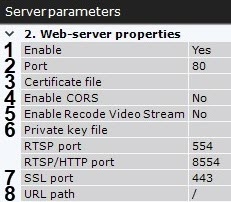
By default, the Web-Server starts automatically together with the Server. If you want to disable the Web-Server, set the value of the Enable parameter to No (1).
In the Port field, enter the port number on which the Web-Server will be located (2).
- To connect to the Web-Server via the SSL port only, do the following:
- Enter the SSL port number to connect to the Web-Server (7).
- Specify a path to the private key file (6).
Specify a path to the certificate file (3).
Attention!
- Axxon One supports SSL certificates in PEM format with TLS cryptographic protocol v 1.2 and 1.3 and AES GCM, AES CCM and AES CBC algorithms. PEM format is a text container that uses base-64 encoding. File extensions in PEM format can be, for example, .pem, .crt, .key. For the correct operation of the Web-Server, the private key (6) and certificate (3) must be represented in one of these extensions. For example, private key—privkey3.pem, certificate—fullchain3.pem.
- If the private key file and certificate file are not specified in the Web-Server settings, the connection to the Web-Server is made via HTTP Port only.
If the Web-Server must use the CORS mechanism, enable the corresponding parameter (4).
Axxon One supports the following:CORS HTTP-headers for GET and POST requests.
Preflight requests.
- If the Web-Server must transcode the stream, enable the corresponding parameter (5). By default, the Web-Server doesn’t transcode the stream, which helps to avoid unpredictable CPU load on the Server. For example, if the browser cannot playback a video in H.265 format, you must switch to a browser-supported video codec (see Real-time video surveillance in the web client) or change the video codec of the camera to the video codec supported by the browser (see Camera).
- In the URL path field, enter the prefix that is added to the Server address (8).
Click the Apply button to apply the configured parameters and restart the Web-Server.
The Web-Server is now configured and available over the internet at the following address: http://<IP address of Axxon One Server>:<Port>/<Prefix>. For example, if the Servers IP address is 10.0.11.1, the port is 8000, and the prefix is /asip-api, then the Web-Server can be accessed at the following address: http://10.0.11.1:8000/asip-api.
Attention!
In Linux OS, for the correct operation of the Web-Server, the ngp user must have permissions to open the directory where the private key and certificate files are located, as well as permissions to read the files. To give the permissions, do the following:
- Run the command:where instead of /home/certs/ you must specify the path to the files.
chmod 751 /home/certs/
- Check the permissions for the directory with files using the command:As a result, the permissions for the directory with files look like this:
ls -lt /home/
total 8
drwxr-x--x  2 user user 4096 aug 20 14:46 certs
drwxr-xr-x 18 user user 4096 aug 20 14:46 user
Overview
Content Tools