
Go to documentation repository
Documentation for Axxon One 3.0/3.1 version. Documentation for Axxon One 2.0 version is also available.

On the page:
Registering local users
To register a local user, do the following:
- Click the Create link at the end of the list of a role, to which you want to add a user.
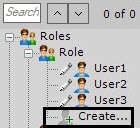
The new user is added to the system, and the additional settings panel for this user opens on the right.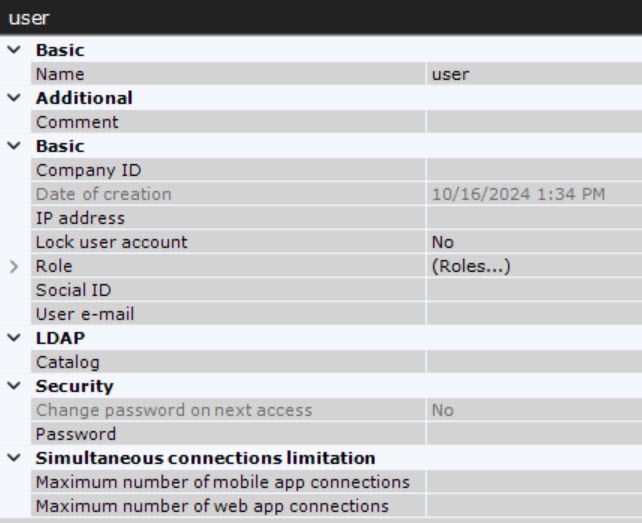
- In the Name parameter, enter a user name.
- In the Security settings group, enter a password:
- In the Password parameter, click the
 button. The Change password window opens.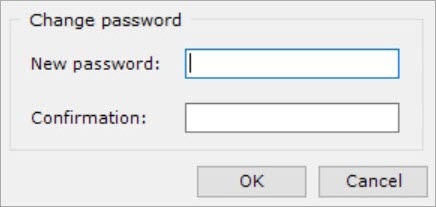
In the New password field, enter a user password (see Security policy).
- In the Confirmation field, reenter the password.
- Click the OK button to save the settings.
- In the Password parameter, click the
In the Change password on next access parameter, select the Yes value if you want to change the specified password upon the next connection to the Client.
- In the Maximum number of mobile app connections parameter, specify the maximum number of connections if you want to limit the number of connections for a user via the mobile Client (see AxxonSoft mobile Clients. Documentation).
- In the Maximum number of web app connections parameter, specify the maximum number of connections if you want to limit the number of connections for a user via the Web-Client (see Starting and logging in to the web client). The parameter also sets a maximum number of RTSP stream requests for this user.
Attention!
Limiting the number of connections for the Maximum number of mobile app connections and Maximum number of web app connections parameters takes effect after you restart the Server (see Start and stop Axxon One).
If necessary, enter additional information about the user in the corresponding fields: User e-mail, IP address, Company ID, Social ID.
- Click the Apply
 button.
A local user has been registered and added to a role.
All created users are displayed in the Users list.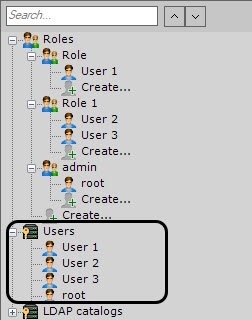
Adding local users to a role
You can add a local user to a role or several roles:
- Using the Roles parameter:
- In the Users list, select a user, who you want to add to a different role.
- In the Roles parameter, in the user settings, click the
 button.
 - In the window that opens, set the checkboxes next to the roles, to which you want to add the user. You can select one or several roles.
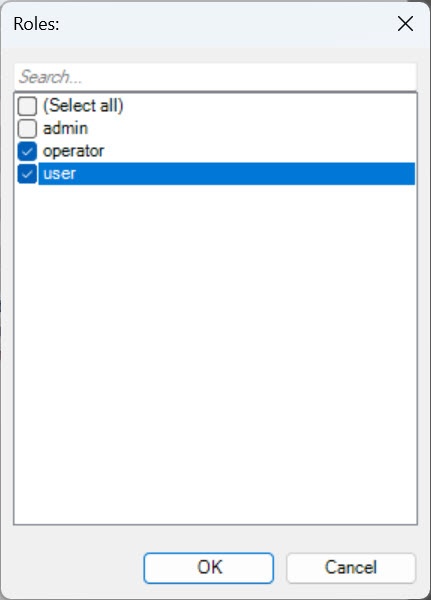
- Click the OK button.
- Click the Apply button.
- By dragging and dropping:
- In the Users list, select a user, who you want to add to a different role.
- Move the user to the required role.
Note
To copy the user to another role, press the Ctrl key and move the user to the required role.
- Click the Apply button.
As a result, a local user is added to one or several roles.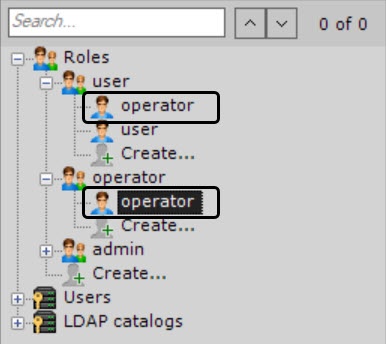
User access permissions are summarized from all roles, to which the user belongs, that is, the permissions with the highest access to the configuration of Axxon One components are selected from all roles.
Locking a local user
To lock an account of a local user, do the following:
- Select a user from the Users list or select a user of a specific role.
- In the Lock user account parameter, select the Yes value.
- Click the Apply button.
As a result, the selected user is locked. Locked users cannot log in. To unlock the user, in the Lock user account parameter, select the No value (see Registering local users).
Removing a local user
To remove a local user from the tree, do the following:
- Select the user that you want to remove.
Attention!
You cannot remove a user you are logged in as.
- Click the Remove
 button.
 - Click the Apply button.
As a result, a local user is removed.
Overview
Content Tools