
Go to documentation repository

Documentation for Axxon PSIM 2.0. Documentation for other versions of Axxon PSIM is available too.
Previous page Next page

On the page:
Start a call
A group call is made as a regular call from the SIP panel to a number with configured forwarding to several numbers (see Configuring numbers of the Axxon PSIM SIP terminal).
Display of the SIP panel when calling
During a group call, the SIP panel window is displayed on top of all windows and looks like this:
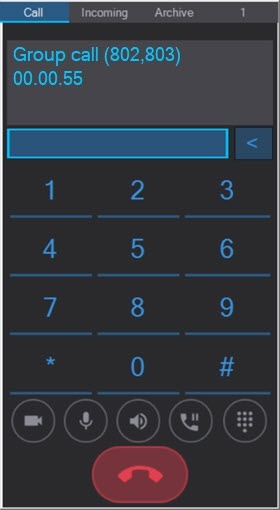
The information field at the top of the window displays the numbers to which the forwarding is made and the duration of the call.
Note
When making a group call, if there is an unknown number in the list of the subscribers, only the number of the unknown subscriber is displayed in the SIP panel call window.
For example, a group call is made to the numbers 1, 2, and to the unknown number 3. In this case, the unknown number is displayed as "Group call (1,2,3)" in the SIP panel call window.
Manage a call
Group call controls are similar to regular call controls.
End a call
Ending a group call is similar to ending a regular call.
Note
If you use a playback file after answering a group call, the call ends automatically as soon as the file is played back for each subscriber (see Macros for working with SIP terminal).
Note
There are two options for ending a call when using a loop file:
- The operator who makes the call can end the call—then the call ends for all subscribers.
- The subscriber who receives the call can end the call—then the call ends for them and continues for other subscribers.
Overview
Content Tools