
Go to documentation repository

Documentation for Axxon PSIM 2.0. Documentation for other versions of Axxon PSIM is available too.
Previous page Next page

The Editor-Debugger utility is used to create, debug, and edit scripts in Axxon PSIM.
The Editor-Debugger dialog window is shown in the figure.
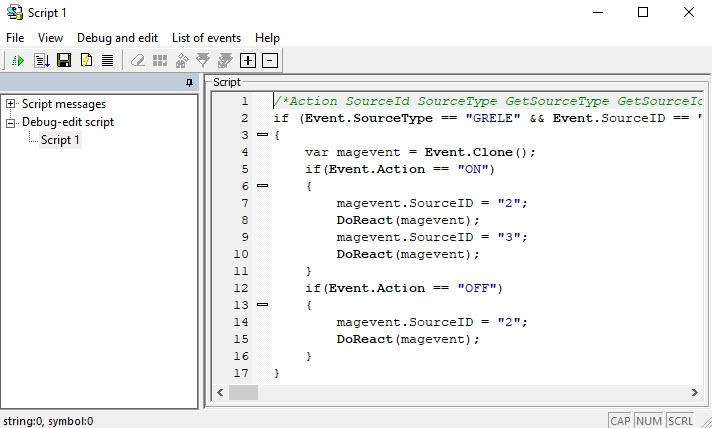
The Editor-Debugger utility contains the embedded text editor and the debugging window.
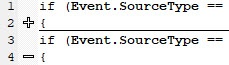
For the convenience of controlling the correctness of writing scripts, the text editor automatically highlights objects, methods, and properties included in the embedded Axxon PSIM object model of the JScript language. Also, you can collapse the code blocks using the - or + buttons to the left of the Script text field.
Note
When you switch between scripts, script messages, and other objects in the Editor-Debugger utility tree, the settings of the blocks collapse are reset, that is, all blocks in the script become expanded.
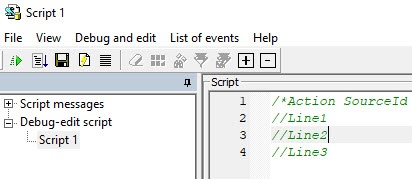
The position of the cursor in each script is stored within one Axxon PSIM session (the cursor position is reset at restart). For example, if you place the cursor at the end of the //Line 2 line in Script 1, then switch to Script 2 and perform any action in it, the cursor still stays at the end of the //Line 2 line when you return to Script 1.
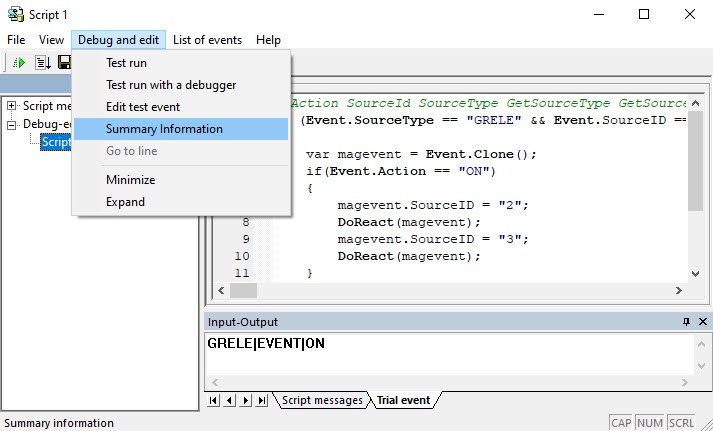
The debugging window of the Editor-Debugger utility allows viewing the information about all events registered in the system. You can set the event filter that is displayed in the debugging window. You must create the separate debugging window for each Script system object in the Editor-Debugger utility, which allows you to debug each script individually using the filters.
To debug the script, you can perform the test run by using the test event set by the user generated by the utility and not registered in the system. To display or edit this event, select Debug and edit → Summary Information, and then go to the Trial event tab on the panel that opens at the bottom of the window. For details, see Creating and using test events.
You can save the created script in the Script system object or in the text file on the computer hard drive.
Overview
Content Tools