
Go to documentation repository

Documentation for Axxon PSIM 2.0. Documentation for other versions of Axxon PSIM is available too.
Previous page Next page

To search for events and reactions, do the following:
- Click the Search button (1). The Find window opens.
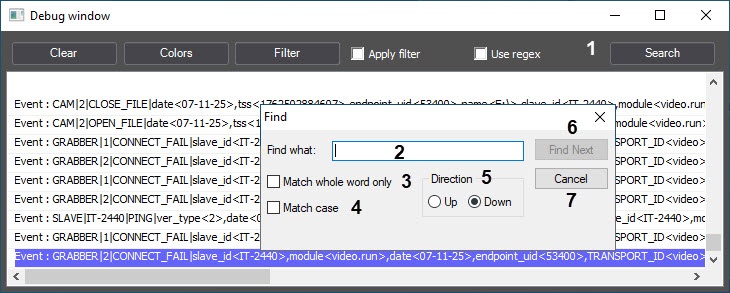
- Specify the search criteria in the Find what field (2).
- If you want to search for the entered string as an independent word, not present in other words as a part but separated from them by at least one space, set the Match whole word only checkbox (3).
- If you want the search to be case sensitive, set the Match case checkbox (4).
- Set the Direction switch into the position corresponding to the search direction (5).
- To view the next search result, click the Find Next button (6).
Note
To close the Find window, click the Cancel button.
Search for events and reactions is complete.
Overview
Content Tools