
Go to documentation repository

Documentation for Axxon PSIM 2.0. Documentation for other versions of Axxon PSIM is available too.
Previous page Next page

You can create the database backup copy using the idb.exe utility (see Create a backup copy of databases). You can also restore the database from the backup copy using the idb.exe utility in the following way:
- Open the idb.exe utility (see Starting and shutting down the idb.exe utility).
From the Select data source drop-down list, select the MS SQL database—Basic data.
Note
To restore the vertical solution database from the backup copy, you must select the vertical solution database, for example, the Monitorsstv data source for Monitoring PSIM.
- Click the Restore from backup button (1).
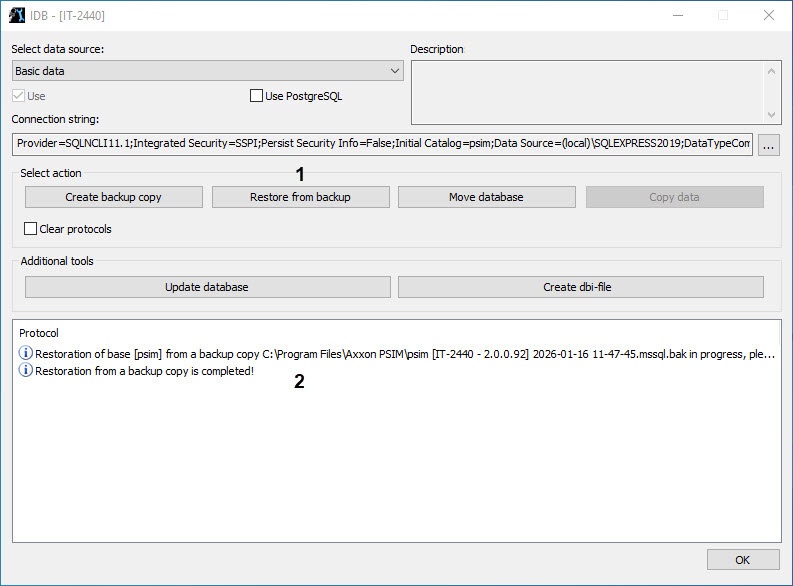
- Using the standard dialog window for opening files, select the file created earlier with the database backup copy.
As a result, the process of restoring databases from the backup copy starts. Information about the process is displayed in the Protocol informational table (2).
Restoring from the backup copy is completed when the Restoration from a backup copy is completed! message is displayed in the Protocol table. - To finish the work, click the OK button. As a result, the window closes automatically.
Restoring a database from the backup copy is complete.
Overview
Content Tools