
Go to documentation repository

Previous page Next page

Attention!
If the USB/RS-485 typical protocol converter is used for the Trezor PIDS connection, it should have the automatic information routing (for example, the ‘BOLIDUSB-RS485’ type) and have its own driver installed.
The Trezor PIDS connection setup to ACFA Intellect is performed in the following way:
- Create the Security equipment object on the base of Computer object on the Hardware tab settings dialog box.
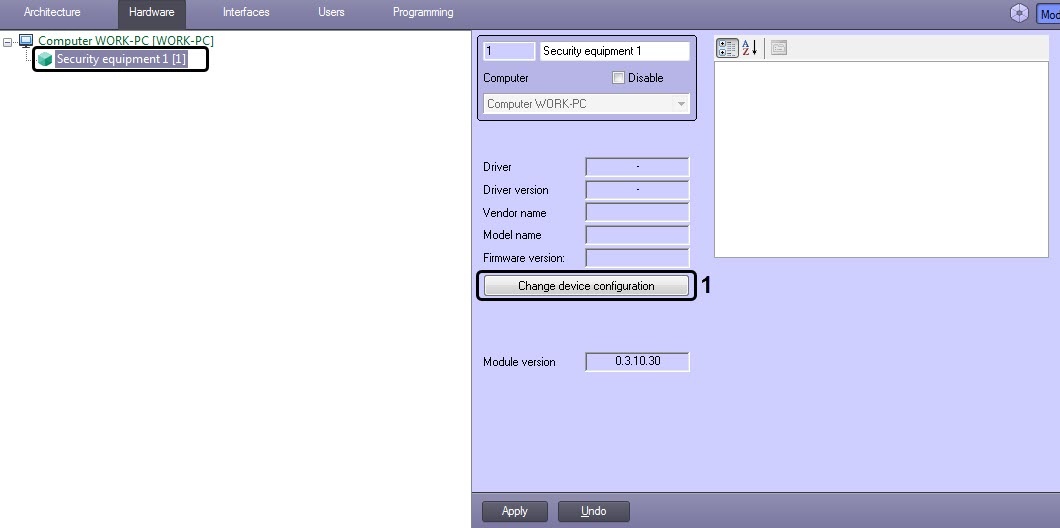
- Click Change device configuration button (1).
- Select Trezor from the Vendor name drop-down list (2).
Select a Trezor device model from the Model name drop-down list (3).
Note
Firmware version field is filled automatically.
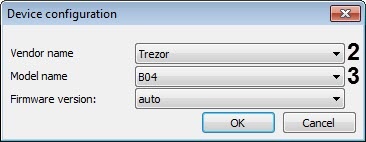
- Click OK
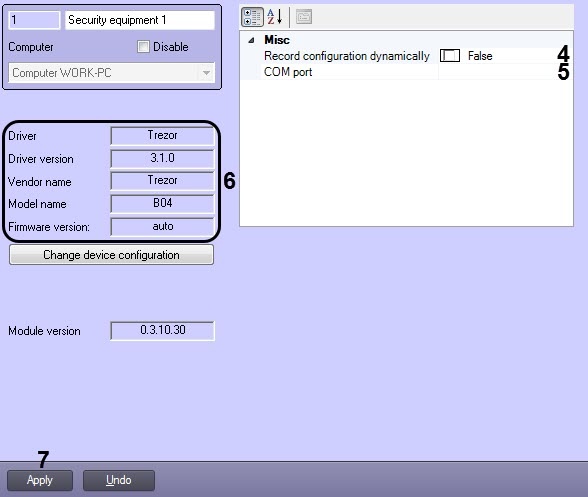
- Set the True value for the Record configuration dynamically parameter (4), if required, so as any changes, which have been made in ACFA Intellect will be written in the controller, otherwise specify False.
Specify the COM-port for the COM port parameter (5) to which the Trezor controller is connected. To identify the COM-port number go to the Windows Device Manager.
Note
Device characteristics are automatically read and specified in the area (6).
Click Apply (7).
Note
After clicking the Apply button, an object tree will be created corresponding to the Trezor PIDS configuration.
The Trezor PIDS connection setup to ACFA Intellect has been finished.
Overview
Content Tools