
Go to documentation repository
Documentation for Axxon One 3.0/3.1 version. Documentation for Axxon One 2.0 version is also available.

Vehicle search allows finding recognized vehicles in the archive and filtering vehicles according to the specified criteria.
Attention!
Vehicle search is available for users with appropriate access level settings (see Role).
To search for vehicles, do the following:
- Open the required layout (see Configuration of layouts).
- Click the required camera.
- Click the Search button located in the lower right corner of the surveillance window (see Search in archive).
- Set the search interval (see Setting a search interval).
- Click the
 button.
 - Select the Vehicle search item.
- Click the button to add the vehicle search criteria specified in the table:
Criterion Value Description Vehicle search Detector Vehicle recognition RR Select the detector from the drop-down list by events of which you want to search Class Unknown The value is set by default. The vehicle class isn't recognized Car Select the vehicle class from the drop-down list Truck Bus Motorcycle Light commercial vehicle Trolleybus Tram Van Minivan SUV Pickup Average vehicle Large vehicle Mega-large vehicle Special transport Dump truck Sedan Model Enter the full name of the vehicle model in Latin letters or digits. Case-insensitive
Note
- Examples of the correct input: Outlander, Astra, Creta, 406 (for Peugeot 406).
- The full list of possible models is given on the page Functionality of Vehicle recognition RR.
Manufacturer Enter the full name of the vehicle manufacturer in Latin letters. Case-insensitive
Note
- Examples of the correct input: Mitsubishi, Opel, Hyundai.
- The full list of possible manufacturers is given on the page Functionality of Vehicle recognition RR.
Color Brown Select one or more of the required vehicle colors Red Orange Beige Yellow Green Blue Purple Pink White Gray Black Unrecognized color 
By default, the checkbox is cleared. If you want to find an unrecognized vehicle color, you must set the checkbox 
Select all By default, the checkbox is cleared. If you want to find a vehicle of all colors, including an unrecognized color, you must set the checkbox Vehicle headlights Undefined The value is set by default. The state of vehicle headlights isn't recognized Turned on Select the state of vehicle headlights from the drop-down list Turned on Speed From Set the required vehicle speed. The value must be in the range:
- Kmph: [0, 250];
- Mph: [0, 155]
Attention!
The unit of vehicle speed depends on the unit selected in the Speed detection field in the detector settings (see Configuring Vehicle recognition RR).
To Direction Select the vehicle movement direction from the drop-down list Undefined The value is set by default. The vehicle movement direction isn't recognized Incoming The vehicle is moving towards the camera Outgoing The vehicle is moving away from the camera Axle count Enter the required number of vehicle axles. The value must be in the range [0, 50] Note
To delete a criterion, click
 .
. - Click the Search
 button.
Note
After you start the search process, you can stop it at any time. To do this, click the Stop  button that replaces the search start button.
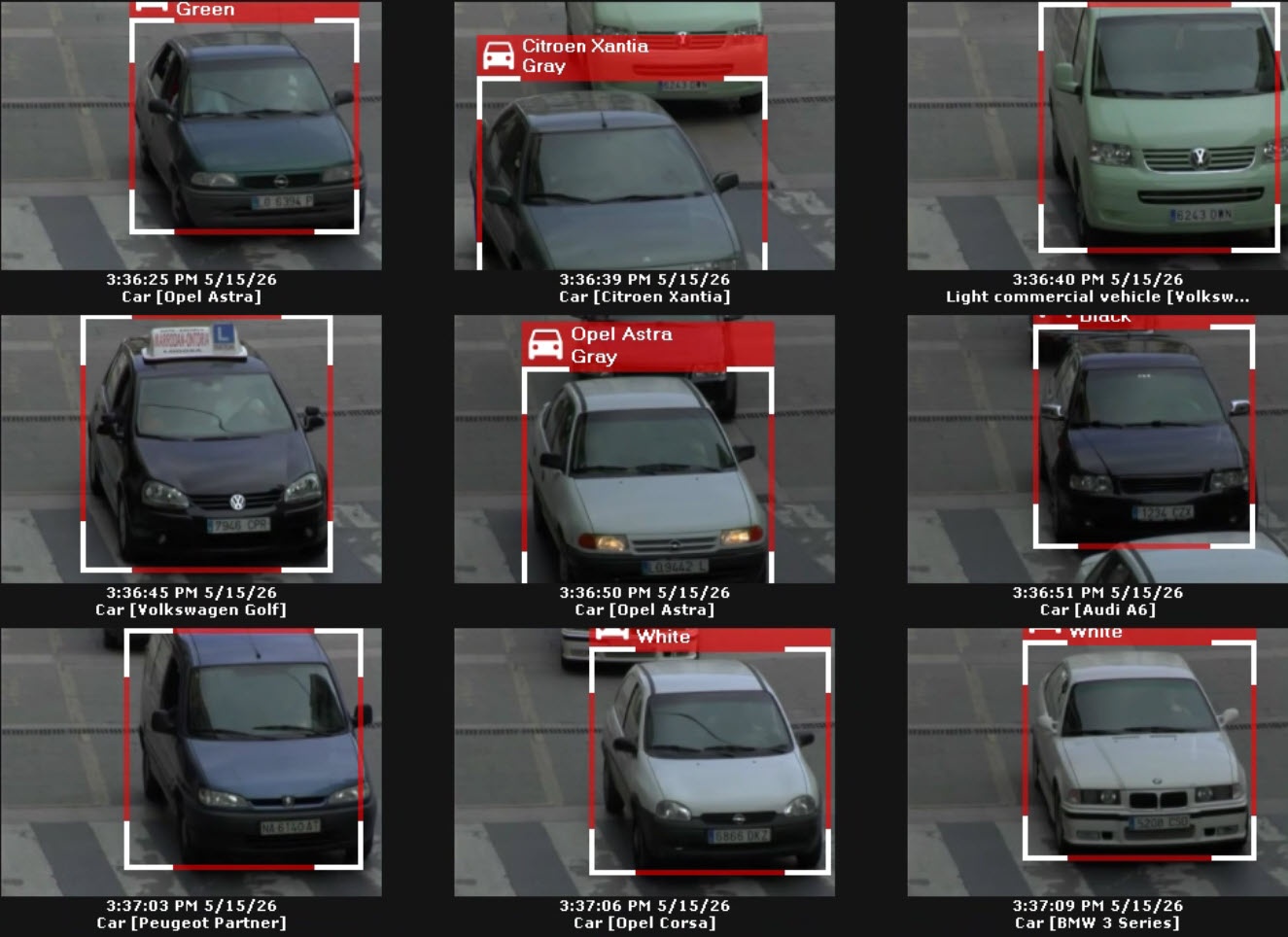
The search results panel displays frames with vehicles that meet the specified search criteria.
Overview
Content Tools