
Go to documentation repository
Documentation for Axxon One 3.0/3.1 version. Documentation for Axxon One 2.0 version is also available.

Before you start Axxon One, check the readiness for operation of the entire communication environment, cameras, microphones, and other system components.
The Axxon One server starts automatically when the operating system starts (see Start the server).
To start the Axxon One client, do the following:
- Start the Axxon One client from:
- Axxon One shortcut on the desktop.
- Start menu → All Programs → Axxon One → Axxon One.
- notification area Run AxxonOne (see Tray Tool utility).
- command line by specifying the login, password, and server parameters. All parameters are optional. For example, C:\Program Files\AxxonSoft\Axxon One\bin>AxxonOne.exe --login=root --password=root --server=127.0.0.1. To connect to multiple servers (see Cross-System client), you must list the servers separated by commas. For example, C:\Program Files\AxxonSoft\Axxon One\bin>AxxonOne.exe --login=root --password=root --server=10.0.11.30, 10.0.11.34.
- Go to Start menu → All Programs → Axxon One → Axxon One. The Axxon One client starts, and an authorization window opens.
- In the Server name or IP address field, select the server to which you want to connect.
- In the Username field, enter the username of the Axxon One user.
- In the Password field, enter the password of the current Axxon One user.
- Click the Connect button.
Attention!
When you log into the system for the first time, use the username root that has administrator permissions. Enter root into the Username and Password fields. A window opens in which you must enter a new password twice.
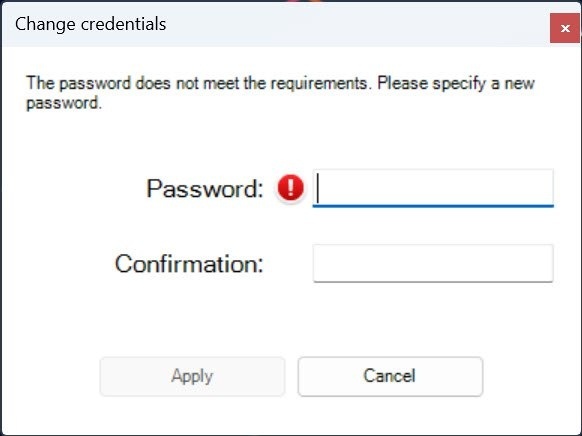
When you hover the cursor over the
 icon, a help window appears in which you can see the requirements for the new password (see Security policy). Click the Apply button to save the new password.
You must save the new password securely (see How to recover the password of the root user (superuser)?).
The administrator then needs to configure the system for multi-user access (see Users).
When the authorization process is complete, the physical monitor displays the video surveillance monitor.
To stop the Axxon One client, you must exit user interfaces. To do this, do one of the following:
- Click the
 button in the upper right corner of the Axxon One window.
Note
If the client is displayed in full screen mode (enabled by default, see User Interface), the
button isn't displayed. - Click the
 button located on the Settings tab.
 - In the Windows OS taskbar, in the context menu of the Axxon One icon, select Close window.
When you perform one of these actions, the authorization window opens. To stop Axxon One (completely exit the client), click the Close button.
To stop the Axxon One server, do one of the following:
- Stop the Axxon One server from the notification area Stop server (see Tray Tool utility).
- Stop the NGP Host Service.
Overview
Content Tools