
Go to documentation repository
Documentation for Axxon One 3.0/3.1 version. Documentation for Axxon One 2.0 version is also available.

On the page:
General information
The server corresponds to the computer with the installed Axxon One in the Server and client configuration that is included in the domain.
When you select the Server object on the Devices tab, the following information is displayed:
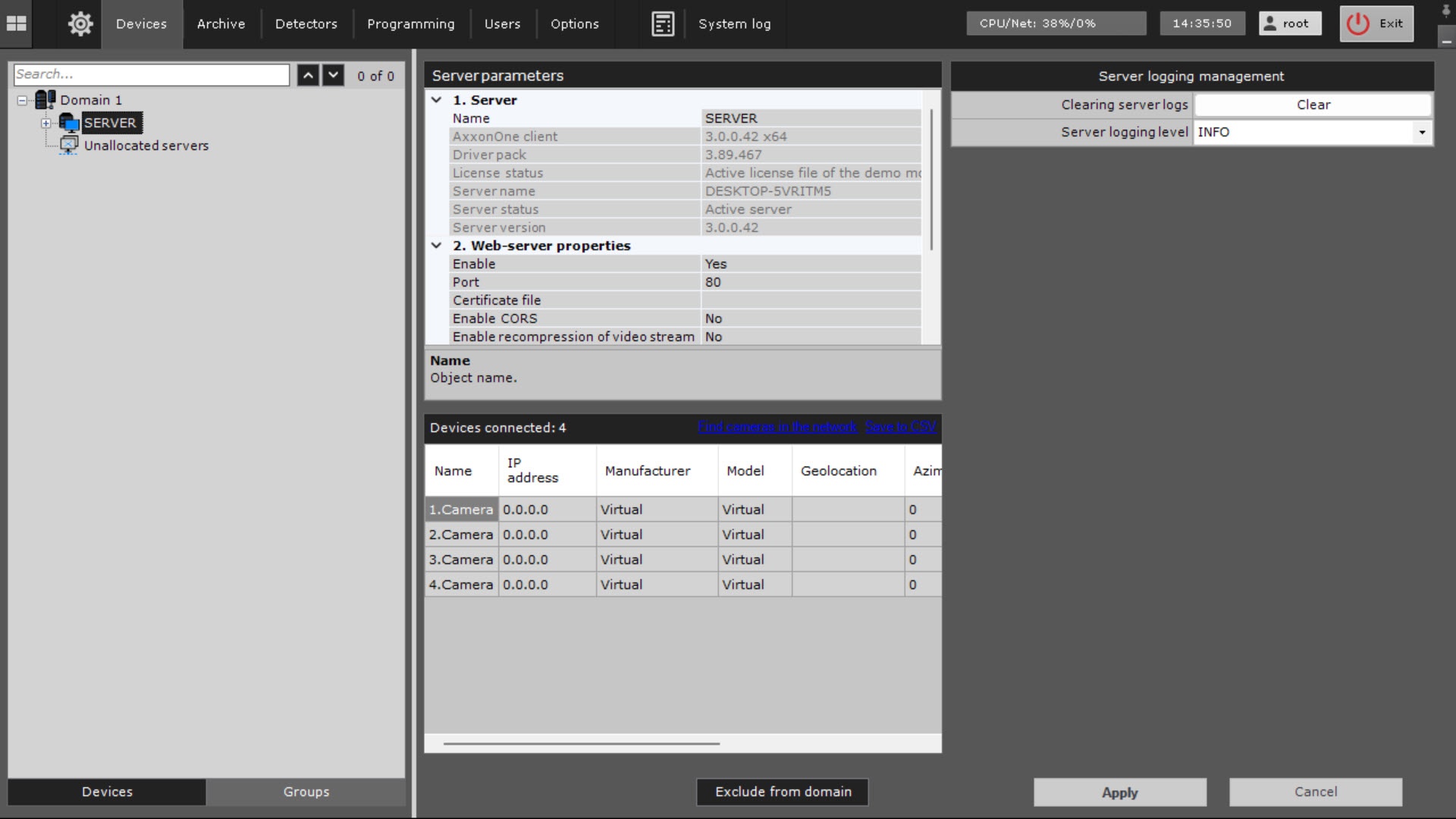
- The version of the installed Axxon One and the used license in the Server version and License status parameters.
- The server name. By default, the server name matches the computer network name. To change this name:
- Enter a new name in the Name field.
- Click the Apply
 button.
- The group of settings for configuring the Web server and RTSP server in the Web-server properties section (see Configuration of the Web server, Configuring the RTSP server).
The list of cameras connected to the server, with the main parameters in the Devices connected section. The list of cameras is given in the table with the following columns: Name, IP address, Manufacturer, Model, Geolocation, Azimuth, Video Stream, Frame Rate, and Resolution. You can sort the table by each column.
If a camera supports the transmission of multiple streams, then the information in the Video Stream, Frame Rate, and Resolution columns is given in the following way: the parameter value for the video stream of low quality/the parameter value for the video stream of high quality.Note
- If no cameras are created on the server, you can search for IP devices in the network by clicking the Find cameras in the network link (you are redirected to the IP Device Discovery Wizard, see Searching, adding, configuring, and removing IP devices).
- The number of connected devices means the total number of available IP video channels in the system, including the disabled ones.
- If necessary, you can save the camera list to a CSV file. To do this, click the Save to CSV link in the Devices connected section. After you click the link, a window opens where you can select the path to save the file. By default, the file is named *server name*_devices.csv. The resulting file contains the entire list of cameras of the server.
The Exclude from domain button excludes a server from the domain (see Removing a Server from an Axxon-domain).
Manage server logging
To temporarily change the server logging level:
- Go to the Configuration management tab → the Devices tab.
- Select the Server object.
- Specify the required settings listed in the table.
Parameter Value Description Server logging management Clearing server logs To delete all server logs:
- Click the Clear button.
- Click the Apply button
Server logging level Select the required logging level from the drop-down list (see Log management utility) INFO The default value. Information messages, system warnings, and system errors are logged TRACE All system events are logged DEBAG Debug events, information messages, system warnings, and system errors are logged WARN System warnings and system errors are logged ERROR Only system errors are logged Attention!
The server logging level is changed only until the server is shut down. After you restart the server, the level set in the log management utility is used.
- Click the Apply button. To cancel the actions, click the Cancel
 button.
The server logging level is changed.
Overview
Content Tools